


Best AI Tools for Data Analysis in 2026
Short answer: The right AI data-analysis tool depends on where your data lives and how much checking the result needs. ChatGPT, Claude, Gemini, and Julius all offer spreadsheet or file analysis in different workflows.
Short answer: The right AI data-analysis tool depends on where your data lives and how much checking the result needs. ChatGPT, Claude, Gemini, and Julius all offer spreadsheet or file analysis in different workflows. In a real Krater Chat run with GPT 6 Astra, a 14-row synthetic sales CSV was summarized, and the model correctly highlighted a $42,000 row that made up 92.3% of the total. The answer was useful, but it left two requested breakdowns out, so a person still needed to review the result.

What makes an AI data-analysis tool useful for a business?
A useful tool should do more than turn a spreadsheet into a paragraph. It should make it easier to inspect a dataset, ask a specific question, and see how the answer relates to the rows and columns you supplied. For a business owner or operations team, the best fit is the one that saves time without hiding assumptions or encouraging a decision from incomplete information.
Start with the task. A team reviewing weekly sales may need totals by date, region, product, and campaign. A finance lead may need a reconciliation against a trusted report. A marketing manager may need cost and conversion data before discussing return on ad spend. Those are different jobs, and a chat tool cannot infer missing fields just because the spreadsheet contains revenue.
Then consider the working surface. A chat-first product can be convenient when the task includes explaining what the numbers mean, drafting follow-up questions, or exploring more than one file. A spreadsheet-focused product may feel more direct when the team spends most of its time asking questions about tables and generating reports. A tool connected to an existing cloud ecosystem may reduce file transfers, but the account's plan and data-handling settings still need review.
Finally, test the review process. Can the tool state how it calculated a metric? Can you compare the result with a pivot table or a known total? Does it flag a value that is unusual without deciding that it is wrong? Does it tell you when the requested answer is unavailable from the supplied columns? These questions matter more than a demo that looks impressive on a clean sample.
Current AI data-analysis plans and prices
The prices below are US monthly prices displayed on vendor pages checked on November 8, 2026. They are not a ranking, and a subscription price alone does not reveal the file allowance, quality of a particular answer, or whether a feature is active for every account.
ChatGPT
OpenAI's pricing page displayed ChatGPT Plus at $20 per month. OpenAI presents ChatGPT as a general assistant with file uploads and data-analysis features alongside writing, research, and other tools. For a spreadsheet task, check the current plan comparison and the account's in-product model and tools. OpenAI's help pages describe how data analysis and uploads work, but a plan's access and limits can change. See the official pricing page and data analysis guide.
This can be a sensible starting point if your team already uses ChatGPT and only needs to inspect a small number of files. Before committing, test the actual CSV or workbook, ask for a row count and calculation method, and compare the key output with the spreadsheet. If the task is routine reporting, also consider whether the result needs to be exported or repeated by someone else.
Claude
Anthropic's individual pricing page listed Claude Pro at $20 per month in the US. Claude can be considered for file-based conversations where the user wants a written explanation as well as a calculation. The exact supported workflows and usage depend on the current product surface and account. Review Anthropic's plans page, the feature descriptions shown in your account, and the help documentation for supported files before standardizing a team process.
A business should also decide what belongs in a conversational AI tool. Do not upload payroll, customer records, contracts, or other sensitive material unless your organization has approved that use and the relevant account settings. A general-purpose subscription may not be the right system of record for recurring financial analysis.
Google Gemini
Google's Gemini subscription page listed AI Plus with 400 GB of storage at $4.99 per month and AI Pro at $19.99 per month. The same page displayed Ultra starting at $99.99 per month, with a separate 20x usage option at $199.99 per month. Google One's plan page separately listed Google AI Plus with 2 TB of storage at $9.99 per month. The two AI Plus pages show different storage tiers and prices; do not treat them as one identical plan or assume a promotional term that the page does not state. Compare the plan details and checkout for your account. Evidence: Gemini plans screenshot and Google One screenshot.
Gemini may fit a team that already manages files and collaboration through Google. The plan page shows different access tiers, and the practical value depends on the tools available in the account and how the team works with its spreadsheet. Verify whether your specific file workflow is supported before moving a recurring report into a new plan.
Julius
Julius's pricing page displayed Plus at $20 per month, Pro at $45 per month, and Business at $450 per month on monthly billing. It also showed monthly credit allowances of 2,000 for Plus, 5,000 for Pro, and 60,000 for Business. Check the current plan card for how credits are allocated and what collaboration or admin capabilities are included. The pricing page describes Julius as a workspace for analyzing data and research and creating presentations and reports. The current page capture is linked as pricing evidence.
A spreadsheet-oriented product can be a better fit when the team expects to use the same data workflow repeatedly. Still, a high credit allowance does not guarantee that a result is correct or that a particular file will import cleanly. Run a small pilot using a representative, non-sensitive file and record the manual review steps before choosing a team plan.
A real CSV analysis in Krater
To show what an AI-assisted analysis can and cannot do, we ran one small synthetic sales CSV through Krater Chat using the model labeled GPT 6 Astra. We started a fresh conversation, attached the file, and asked for total revenue, revenue and units by region, category revenue, daily revenue, an explicit check of any unusually large order, three practical observations, and two limitations. We also instructed it to use only the file and not to infer profit, customers, or real business behavior.
The file contained 14 rows dated October 1 to 12, 2026. It had columns for date, region, product category, units, unit price, and campaign. It was synthetic, not a real company's transaction history. The answer completed in Krater Chat and identified a single row that changed the interpretation of the total.
Krater GPT 6 Astra, verbatim excerpt: “The sample contains $45,486 in calculated sales, but one unusually large order accounts for 92.3% of that total. Verify that row before using these results to set marketing budgets or inventory levels.”
The response reported these results. The figures below reproduce the returned values; the table formatting is added for readability.
| Metric in the answer | All rows | Without the flagged row |
|---|---|---|
| Rows treated as orders | 14 | 13 |
| Calculated revenue | $45,486 | $3,486 |
| Units | 1,112 | 112 |
| Average order value | $3,249.00 | $268.15 |
| Median order value | $243 | $216 |
The flagged row was dated October 11, in the West region, for Apparel, and tagged to the Social campaign. It listed 1,000 units at $42 per unit, for $42,000. Every other row had between 2 and 20 units. That single row is worth checking against the source system before a manager changes inventory or campaign budgets. The file itself does not tell us whether it was a legitimate bulk order, a data-entry error, or another kind of transaction.
The model also reported category revenue of $43,092 for Apparel, $1,224 for Coffee, and $1,170 for Home. Without the flagged row, it reported $1,092 for Apparel, $1,224 for Coffee, and $1,170 for Home. It showed West revenue of $42,585 overall and $585 without the flagged row. Social revenue was $43,092 overall and $1,092 without that row. Since the large row is both Apparel and Social, the sample cannot isolate a campaign effect from the product category.
The model's main warning was useful: revenue alone does not establish profit, marketing return, or conversion. The data contained no ad spend, cost of goods, returns, discounts, tax, shipping, customer ID, or order ID. It covered less than two weeks, not a full month. The answer treated each row as one order, although the CSV had no order identifiers to confirm that assumption.
There was also a completeness issue. The prompt asked for daily revenue and units by region, but those breakdowns were not present in the saved response. We did not calculate the missing tables and present them as if Krater had returned them. Our separate arithmetic check matched the total, the flagged row, and the remaining revenue against the CSV. That validation does not replace a review of every requested field.
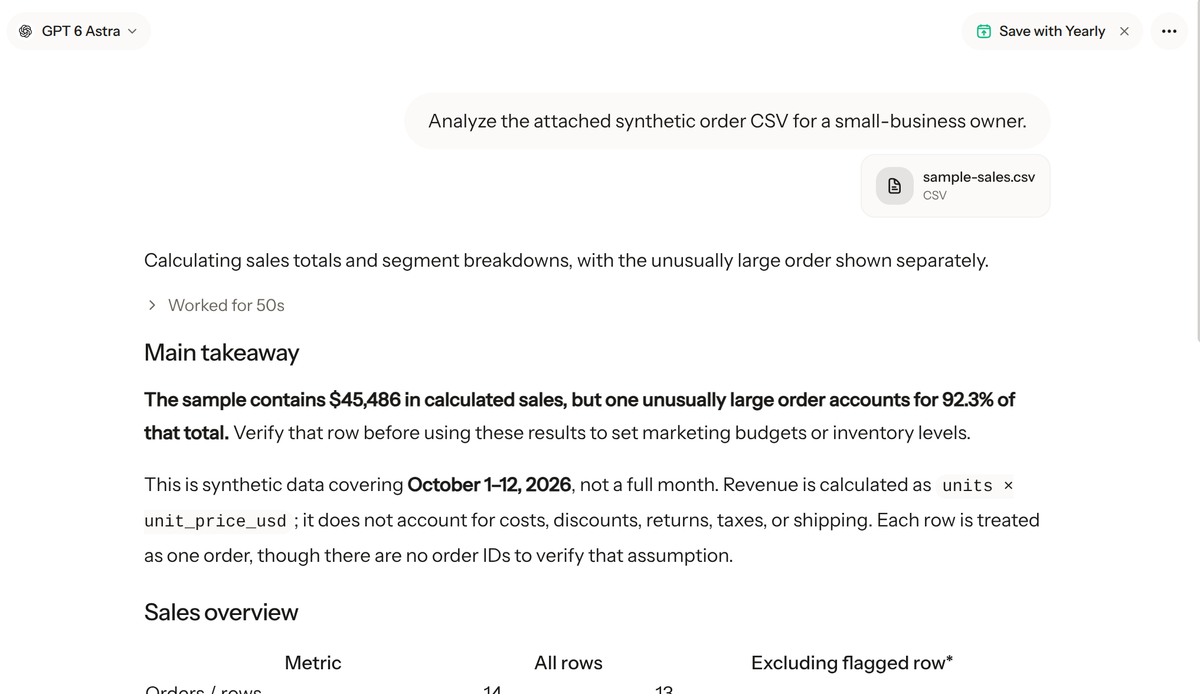
This was one file-analysis task, not a head-to-head test of ChatGPT, Claude, Gemini, Julius, or Krater. We did not measure accuracy across a benchmark, compare response speed, or claim that one product is generally better. It is a concrete example of a model surfacing an outlier and also omitting two requested outputs. See the testing methodology for how Krater's model comparisons differ from this product walkthrough.
How to test an AI tool with your own spreadsheet
Use a small, approved sample before uploading a live business report. Keep the original file unchanged and write down what a correct result should contain. If you do not know what the expected answer is, start with row counts, totals, and missing-value checks rather than asking for a strategic recommendation.
- Define the decision. Be specific about the output, such as revenue by week and region, rather than saying “analyze sales.” Name the period and any field definitions the tool should use.
- Describe the columns. Tell the tool which field represents a date, quantity, price, category, or status. Ask it to state the formula it used and whether it treated each row as one transaction.
- Ask for validation checks. Request row count, total units, missing values, duplicate keys, unusual values, and a subtotal that reconciles to the total. If the file has an order ID, ask the tool to distinguish order count from row count.
- Separate what is known from what is inferred. A CSV with revenue does not establish profit. A table with campaign names but no spend cannot establish return on ad spend. Ask the tool to list what fields are missing before it gives a recommendation.
- Verify a sample of calculations. Check the largest transaction, a few ordinary rows, and the final aggregate in a spreadsheet, a business intelligence tool, or a trusted script. Do not rely only on a fluent explanation.
- Save the method. Keep the prompt, file version, output, and reviewer notes together. For monthly reporting, use a repeatable template and compare the new period with a known prior result.
A useful prompt can be short but explicit: “Use only the attached CSV. Count rows and distinct order IDs separately. Calculate revenue as quantity multiplied by unit price. Report revenue and units by month, region, and category. Identify unusual rows and show totals with and without each flagged row. State any requested output you cannot provide from these columns. Do not infer profit, customer behavior, or campaign return without the required fields.”
Common mistakes when using AI for data analysis
Confusing rows, orders, and customers
One row is not always one order, and one order is not always one customer. A line-item export may contain several rows per order. Without a stable identifier, a model can calculate row-level counts but cannot reliably report unique orders or customers. Ask for the distinction and provide the key field if it is safe and appropriate to use.
Assuming an outlier is an error
An unusual record is a reason to inspect the source, not a reason to delete it automatically. A large sale may be valid. A repeated row may be a duplicate, but it may also represent separate products. Preserve both the full result and a clearly labeled sensitivity check so the reviewer can make the call.
Asking for ROI without cost data
Revenue by campaign is not return on ad spend. For that calculation, the dataset needs campaign spend and a defined conversion value, and the attribution rules must be understood. Margin analysis requires costs, discounts, returns, and other relevant expenses. If those fields are absent, the tool should say the result cannot be calculated.
Trusting a chart without checking the table
Charts can make a pattern easier to see, but they can also make an incomplete dataset look definitive. Check the axis, date range, aggregation, excluded rows, and unit. For a small file, compare the chart values with the table or a known total before sharing it with a team.
Which tool should a business choose?
Choose ChatGPT if your team already uses it for several kinds of work and needs file analysis as one part of a general assistant workflow. Confirm that the current plan includes the tools and file allowance you need.
Choose Claude if the team prefers a conversational workflow for files and follow-up explanations. Check the current plan and feature availability in the account, then test a representative file before making it part of recurring reporting.
Choose Gemini if your team is already organized around Google and the storage and plan details match your needs. The AI Plus pages display different storage tiers, so compare the exact plan shown to your account rather than assuming one price covers every version.
Choose Julius if the business wants a data-focused workspace and its workflow, credit allowance, and collaboration options fit the team's reporting needs. A pilot should include the same kinds of files and checks that the team will use after purchase.
Try Krater if your team wants to work with 500+ AI models in The All-in-One AI Workspace and compare which model is useful for a particular task. The CSV example above shows one possible workflow. It does not show that every model handles every file well, and the result still needs a person to review it.
Whichever product you choose, set a simple rule: AI may help explore and explain a dataset, but a person responsible for the report verifies important totals and approves business decisions. Use an approved account, the smallest suitable dataset, and a documented process for sensitive information.
How we checked
We reviewed the vendor pricing pages and plan descriptions linked below on November 8, 2026. Gemini's two AI Plus prices are presented separately because the Gemini subscription page showed 400 GB, while the Google One page named the 2 TB version. No introductory price term was stated on either page.
For the hands-on example, we used a synthetic 14-row CSV in a fresh Krater Chat conversation with GPT 6 Astra on November 8, 2026. We did not upload real customer data, test live financial records, or compare the named vendor products in a benchmark. We checked the CSV arithmetic separately and disclose the two requested breakdowns that were absent from the answer.
Frequently asked questions
Which AI tool is best for analyzing a CSV?
There is no single best choice for every CSV. ChatGPT, Claude, Gemini, and Julius offer different file and chat workflows. Choose a product that supports your file, exposes the needed feature on your plan, and lets your team verify the answer against the source data.
Can an AI tool calculate sales revenue?
It can calculate a requested total from a file, but the result should be checked. Specify the formula, date range, and how rows relate to orders. Validate the total against a spreadsheet or source system, especially when a single row changes the result substantially.
Can AI tell me whether a marketing campaign was profitable?
Not from revenue alone. Profit requires relevant cost data, and campaign return requires spend and a defined attribution method. If the file does not include those fields, ask the tool to state the limitation instead of guessing.
Should I upload customer or financial records?
Follow your organization's data policy and the vendor's current terms and account settings. Use an approved business account, remove unnecessary personal fields, and start with a synthetic or de-identified sample when testing. Do not assume that a personal subscription is approved for confidential company data.
Does a high plan price mean better analysis?
No. A higher price may include more access, credits, or other product features, but it does not prove that an answer is accurate for your file. Compare the workflow and run a small evaluation on representative data before upgrading a team.
Why did the Krater example not show daily revenue?
The prompt requested daily revenue, but that breakdown was not present in the saved Krater answer. We leave it out rather than calculate it separately and imply that the model returned it. A reviewer can ask a follow-up or verify the values directly in the CSV.
Related reads
Compare ChatGPT's current file limits in ChatGPT file upload limits, review ChatGPT Go vs Plus, or see current vendor plan details in our Claude pricing and Gemini pricing guides.
Get your free AI consultation
Thirty minutes with Adam Johansson, an AI expert who maps out what actually fits your business: the right tools, plan and setup for your team size and usage. Free, no strings attached.
Free for any business, any size. We reply within one business day.

Adam Johansson
AI Advisor, Krater
Bottom line
For business analysis, choose the tool that fits the team's existing files and makes its calculations easy to inspect. The vendor pages show broadly similar individual starting prices for some plans, but plan features, storage, and usage differ. A small file test can reveal whether the product catches an important outlier and whether it completes every requested breakdown. Treat AI as an assistant for exploration, verify its outputs against the source, and keep the final business decision with the people responsible for the data.
Sources
- OpenAI ChatGPT pricing
- OpenAI Help Center: Data analysis with ChatGPT and File uploads FAQ
- Anthropic Claude plans and pricing
- Google Gemini subscriptions
- Google One plans and pricing
- Julius pricing
- Krater Chat analysis of the synthetic sample CSV, captured November 8, 2026. A screenshot of the response is shown above.