

Best AI Image Generator in 2026: 10 Models, 6 Identical Prompts, Every Output Shown
Ten current image models, six identical prompts, no prompt tuning, every output shown unedited with generation time and credit cost. Nano Banana, Flux 2, Ideogram V4 and Seedream 5.0 passed all six; here is what the rest missed.
The best AI image generator in our September 2026 test is Nano Banana (Google's Gemini image model), which followed all six of our fixed prompts, rendered every line of text correctly and returned each image in about 9 seconds for 10 Krater credits. Flux 2 tied it on accuracy at 4 credits and 7 seconds an image, the fastest and the best value for volume work. Ideogram V4 also went six for six at just 3 credits, and so did Seedream 5.0, the only model here that returns 1920 pixel images. GPT Image 2 drew the best looking poster and illustration but took 30 to 50 seconds per image. We ran the same six prompts, with the same settings and no prompt tuning, through ten current models on 27 September 2026 and show every output below, unedited.
Key Takeaways
- Best overall: Nano Banana. Six passes out of six, correct text on the poster and infographic, correct count of apples and lemons, 9.2 seconds median, 10 credits an image.
- Best value: Flux 2. Also six out of six, the fastest model in the test at 7.3 seconds median, and the second cheapest at 4 credits an image (about 5 cents on the Krater Pro plan).
- Highest resolution: Seedream 5.0. Six out of six at 1920 x 1920 pixels, the only model above 1024 in this round. Slow, 46 seconds median.
- Best typography and illustration: GPT Image 2. The strongest poster and the most polished fox illustration, five passes and one partial. Slowest of the fast group at 39 seconds and 14 credits.
- Cheapest perfect score: Ideogram V4 at 3 credits and 11 seconds, six out of six, though its poster headline came out smaller than asked. One of its portrait requests was refused by the provider's content filter and succeeded on retry.
- Text in images is no longer a differentiator. Eight of ten models spelled "NORTH SEA JAZZ" and "Rotterdam 10 to 12 July" correctly. Two years ago almost none could.
- The counting prompt still separates models. All ten got exactly three apples and two lemons. Only six placed them where asked; Qwen Image 3, Recraft 4.1, Krea 2 and Kling O3 got the objects right but the layout wrong.
Quick picks
| If you want | Pick | Why, from this test |
|---|---|---|
| The safest all rounder | Nano Banana | 6 of 6 prompts, clean text, 9 s, 10 credits |
| Lots of images for little money | Flux 2 | 6 of 6, 7 s, 4 credits, the best cost per image of any model that passed everything |
| Print or large format | Seedream 5.0 | 1920 px output, 6 of 6, but budget 30 to 80 s per image |
| Posters, covers, illustration | GPT Image 2 | Best looking typography and storybook art, 39 s, 14 credits |
| Rough drafts at the lowest cost | Ideogram V4 | 3 credits, 11 s, 6 of 6 |
| Photoreal people | Nano Banana, Flux 2, Seedream 5.0 | All three kept both hands visible and the helmet, hair and street as asked |
| Product photography | Flux 2 or Nano Banana 2 | Correct mug, walnut lid, beans in front, soft left light |
How we tested
Most "best AI image generator" lists either give every tool a different prompt or describe the results without showing them. We did the opposite. Six prompts were written before the test and frozen. Each was sent to ten models through the Krater API on 27 September 2026 with identical settings: one square image per request, no system prompt, no model specific rewording, no upscaling, no retries of a finished image to get a nicer one. When a provider returned an error we logged it and requested the same prompt again. Generation time is the wall clock time from request to image URL. Credits are the amount deducted from our test account for each request.
Each output was then checked against the prompt and marked pass (every element present and placed as asked), partial (the subject is right but at least one stated element is missing, wrong or misplaced) or fail (a stated element is wrong in a way that makes the image unusable for the brief, for example misspelled text). These are adherence checks, not taste. Where we say a result looks better we say so separately and you can judge from the grids. A blind aesthetic ranking by two reviewers, as our methodology describes for ranked verdicts, has not been done for this round; the winner above is the model with the most passes at the best speed and price.
The six prompts
- Product photo. "Studio product photograph of a matte black ceramic coffee mug with a walnut wood lid, on a light grey concrete surface, soft window light from the left, shallow depth of field, a few coffee beans scattered in the foreground, no text, no logo."
- Portrait. "Candid photograph of a woman in her sixties with short grey hair laughing while holding a yellow bicycle helmet in both hands, standing on a cobblestone street in Copenhagen at golden hour, 85mm lens, natural skin texture, both hands fully visible."
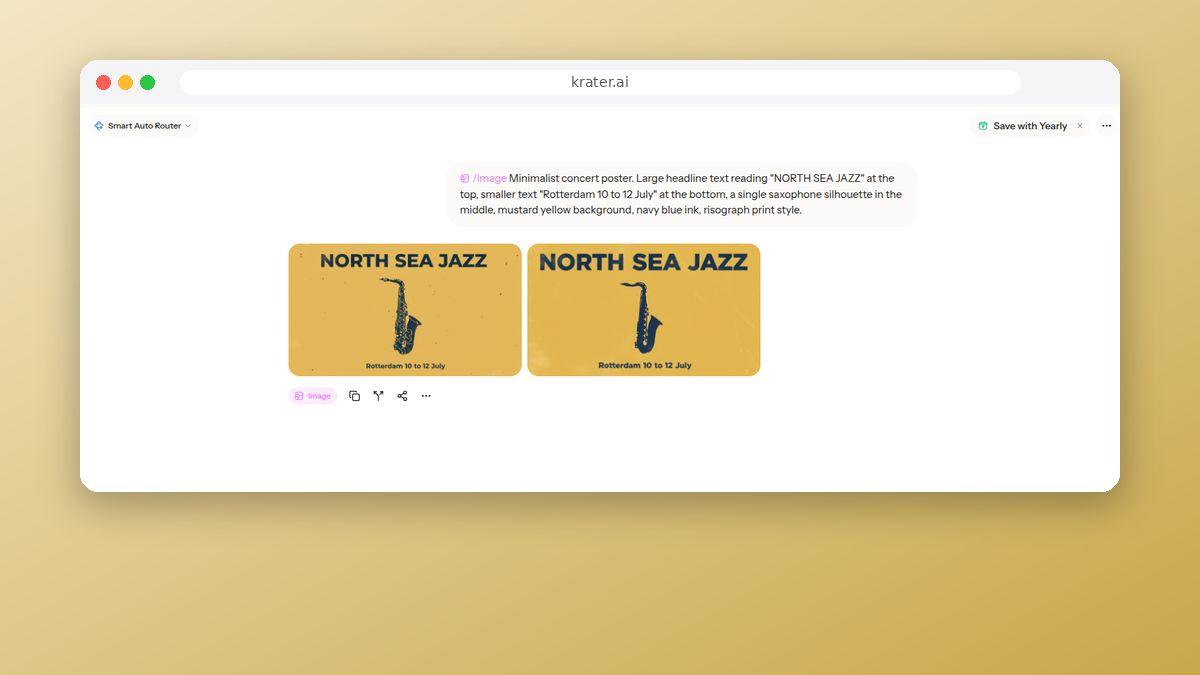
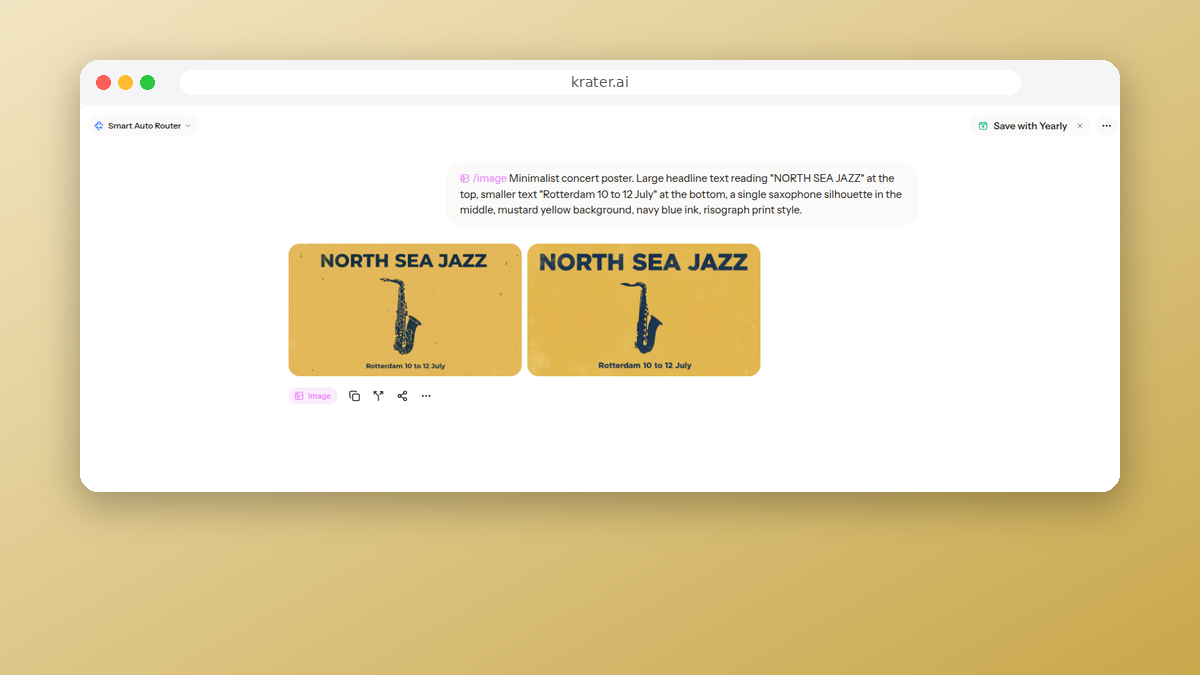
- Text rendering. "Minimalist concert poster. Large headline text reading "NORTH SEA JAZZ" at the top, smaller text "Rotterdam 10 to 12 July" at the bottom, a single saxophone silhouette in the middle, mustard yellow background, navy blue ink, risograph print style."
- Illustration. "Children's book illustration of a small red fox reading a map under an oversized green umbrella in the rain, forest in the background, watercolor and ink, warm palette, whimsical, storybook style."
- Counting and layout. "Flat lay photograph on a white table: exactly three green apples in a row on the left, one blue ceramic bowl on the right containing exactly two lemons, a folded red napkin above the bowl, shot from directly above, even lighting."
- Infographic. "Clean infographic showing a simple three-step process, horizontal, with three numbered circles connected by arrows. Labels under the circles read "Plan", "Build" and "Launch". Flat vector style, white background, teal and charcoal colours, sans-serif text."
The ten models
| Model as shown in Krater | Provider endpoint | Output size | Credits per image |
|---|---|---|---|
| Flux 2 | fal-ai/flux-2 | 1024 x 1024 | 4 |
| GPT Image 2 | openai/gpt-image-2 | 1024 x 1024 | 14 |
| Nano Banana | fal-ai/nano-banana | 1024 x 1024 | 10 |
| Nano Banana 2 | fal-ai/nano-banana-2 | 1024 x 1024 | 20 |
| Seedream 5.0 (Lite) | fal-ai/bytedance/seedream/v5/lite | 1920 x 1920 | 9 |
| Qwen Image 3 | alibaba/qwen-image-3 | 1024 x 1024 | 19 |
| Ideogram V4 (Standard) | ideogram/v4 | 1024 x 1024 | 3 |
| Recraft 4.1 | fal-ai/recraft/v4.1 | 1024 x 1024 | 9 |
| Krea 2 (Medium) | krea/v2/medium | 1024 x 1024 | 8 |
| Kling O3 | fal-ai/kling-image/o3 | 1024 x 1024 | 7 |
All ten are available in Krater's image generator on every plan. Seven were requested with size 1:1; Flux 2, Ideogram V4 and Qwen Image 3 were requested with the square_hd preset, which resolves to the same 1024 x 1024 output for those three models. Midjourney, Canva and Adobe Firefly are not in the grids because we could not run them through the same pipeline with the same settings; they appear in the pricing section from their own published plans.
Results: all ten models, all six prompts
| Model | Pass | Partial | Fail | Median time | Range | Credits | Cost per image on Pro |
|---|---|---|---|---|---|---|---|
| Nano Banana | 6 | 0 | 0 | 9.2 s | 8.1 to 10.1 s | 10 | $0.13 |
| Flux 2 | 6 | 0 | 0 | 7.3 s | 6.9 to 7.8 s | 4 | $0.05 |
| Seedream 5.0 | 6 | 0 | 0 | 46.2 s | 31.7 to 78.8 s | 9 | $0.12 |
| GPT Image 2 | 5 | 1 | 0 | 39.1 s | 32.4 to 53.2 s | 14 | $0.19 |
| Nano Banana 2 | 5 | 1 | 0 | 13.4 s | 12.3 to 16.3 s | 20 | $0.27 |
| Ideogram V4 | 6 | 0 | 0 | 11.0 s | 10.0 to 72.8 s | 3 | $0.04 |
| Qwen Image 3 | 4 | 2 | 0 | 81.5 s | 55.9 to 99.2 s | 19 | $0.25 |
| Kling O3 | 4 | 1 | 1 | 23.9 s | 21.0 to 79.5 s | 7 | $0.09 |
| Krea 2 | 2 | 4 | 0 | 16.5 s | 16.4 to 19.8 s | 8 | $0.11 |
| Recraft 4.1 | 2 | 4 | 0 | 14.7 s | 11.0 to 20.3 s | 9 | $0.12 |
Cost per image is the credit price divided into the Krater Pro plan, $20 for 1,500 credits a month, so 1 credit is about 1.3 cents. Ultra ($49, 4,000 credits) and Max ($119, 10,000 credits) bring the per credit price down a little further. Times are for one image at the sizes above; the long tail on Ideogram (72.8 s) and Kling (79.5 s) was a single slow request each, the rest of their runs were within a few seconds of the median. Qwen Image 3 was slow on every request and returned two provider errors before completing the set.
Prompt 1: product photo
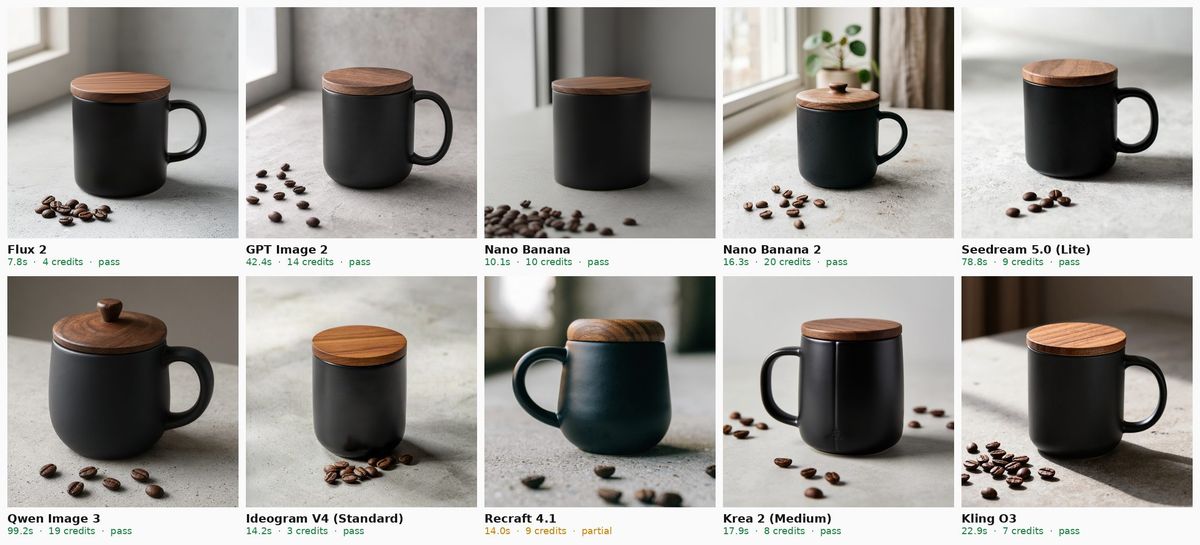
Nine of ten passed. The mug, the walnut lid, the concrete surface and the beans are in every image. The one partial is Recraft 4.1, which lit the mug from the right with a window behind it instead of soft light from the left, and shot it as a squat, glossy mug rather than a matte one. Nano Banana and Ideogram V4 turned the mug so the handle is hidden, which is allowed by the prompt but makes the shot less useful as a listing photo. Nano Banana 2 and Flux 2 produced the images we would put on a product page without a second try: correct lid grain, beans in the foreground, shallow depth of field where it belongs. GPT Image 2 and Seedream 5.0 are close behind with a slightly warmer, more editorial look.
Prompt 2: portrait with a hard constraint
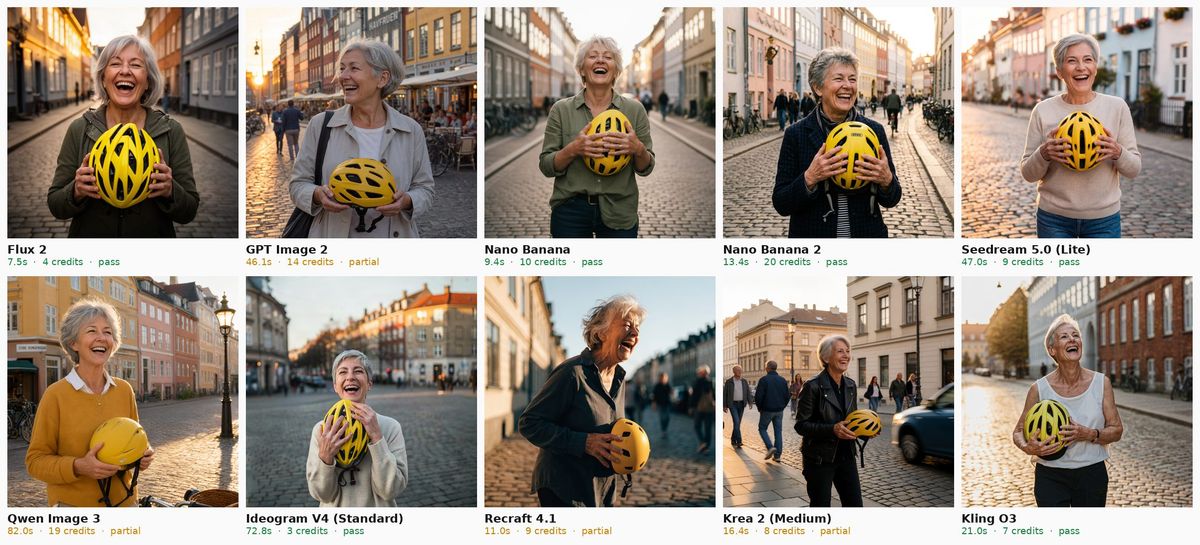
Every model got the woman, the grey hair, the laugh, the yellow helmet and a plausible Copenhagen street at golden hour. Six passed. The four partials, GPT Image 2, Qwen Image 3, Recraft 4.1 and Krea 2, all show the helmet held in one hand or with the second hand hidden, against an explicit instruction. Skin texture is natural on all ten; none of the "plastic face" look that older models had. Ideogram V4 refused this prompt once with a content policy error from the provider (a photo of a real looking person) and produced a normal image on the second request; we count the refusal in the error log, not as a fail.
Prompt 3: text rendering
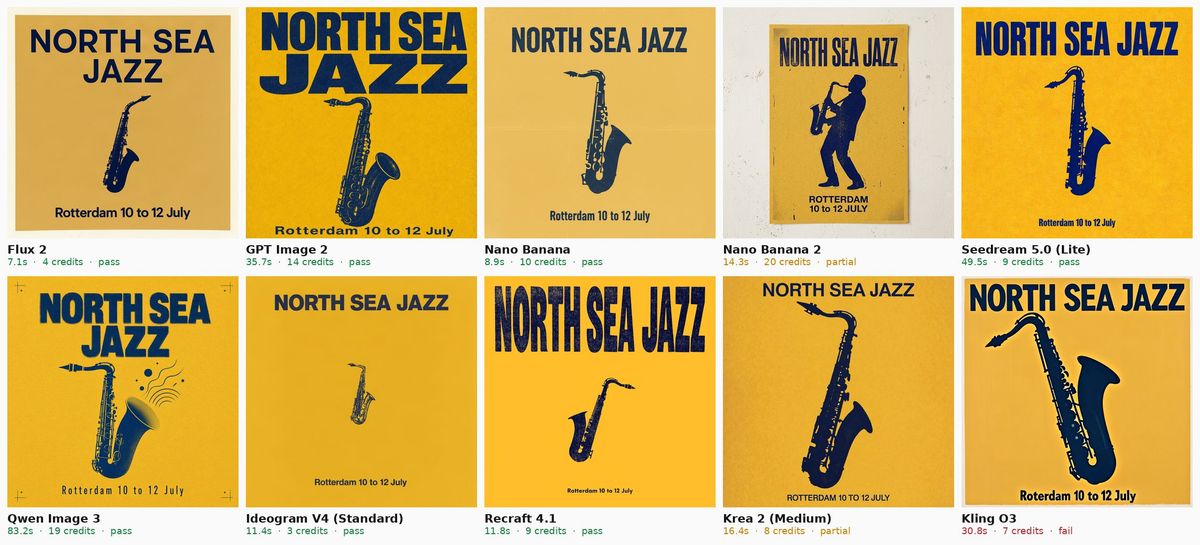
This used to be the test that separated the field, and it no longer is. Eight of ten spelled both lines correctly and placed them where asked. Kling O3 wrote "Roterdam", a fail, because a poster with a misspelled city cannot be used. Nano Banana 2 and Krea 2 are partials: Nano Banana 2 rendered the date in capitals and added a saxophone player where the prompt asked for a saxophone alone, Krea 2 also switched the date to capitals. On looks alone GPT Image 2 is the strongest poster in the set, with a heavy condensed headline and a proper risograph grain, followed by Recraft 4.1 and Seedream 5.0. Ideogram V4, long the default recommendation for text, passed but set the headline small, which is not what "large headline" asked for.
Prompt 4: illustration
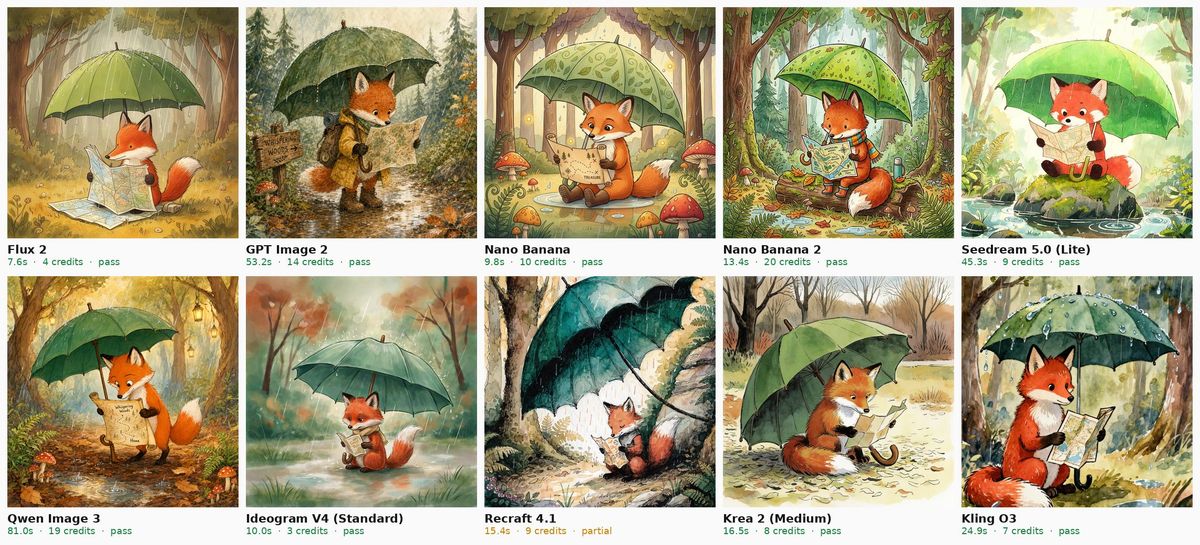
Nine passes. The fox, the map, the green umbrella, the rain and the forest are present in every image. Recraft 4.1 is the partial: the fox is a small figure in one corner under an umbrella drawn as a dark canopy, the map is barely there and the rain is implied rather than drawn. On style, GPT Image 2 and Nano Banana 2 look most like a printed picture book, with ink lines and visible watercolor bleed. Flux 2 and Seedream 5.0 are softer and more painterly. Qwen Image 3 went for a busier scene with more forest detail. If you generate storybook art regularly, this is the prompt to compare closely, because all the passing models are usable and the choice comes down to taste.
Prompt 5: counting and layout
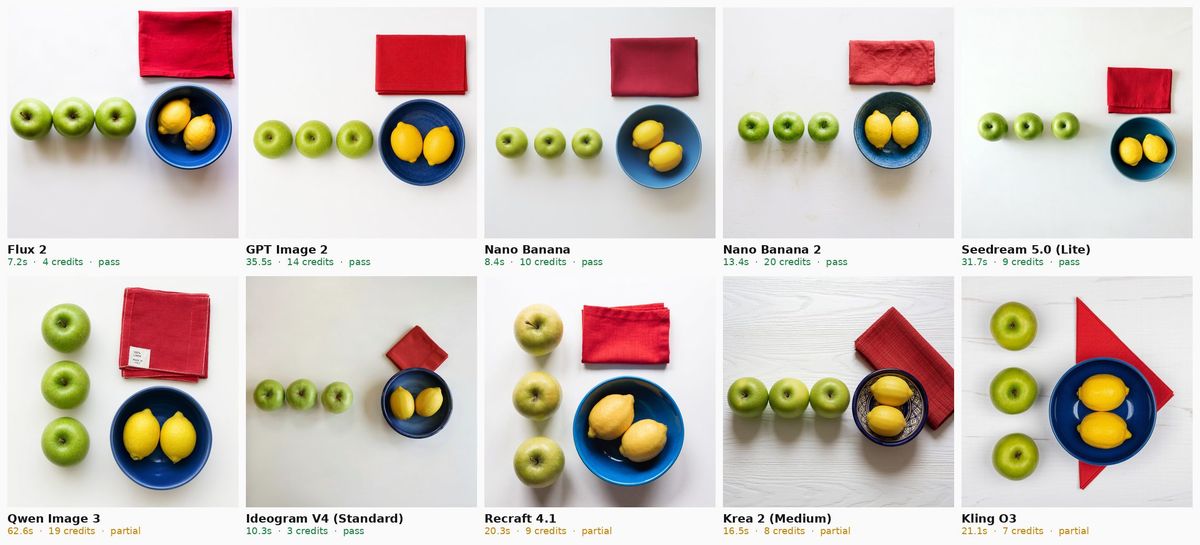
The hardest prompt in the set, and the one with the most partials. Every model counted correctly: three green apples and two lemons in a blue bowl, ten times out of ten. Six also placed them as asked: Flux 2, GPT Image 2, Nano Banana, Nano Banana 2, Seedream 5.0 and Ideogram V4 show the apples in a row on the left, the bowl on the right and the red napkin above the bowl. Qwen Image 3, Recraft 4.1 and Kling O3 stacked the apples in a column instead of a row, and Krea 2 put the napkin beside the bowl instead of above it. Counting small numbers is now reliable across current models; following spatial instructions ("above", "on the left", "in a row") is where they still drift.
Prompt 6: infographic
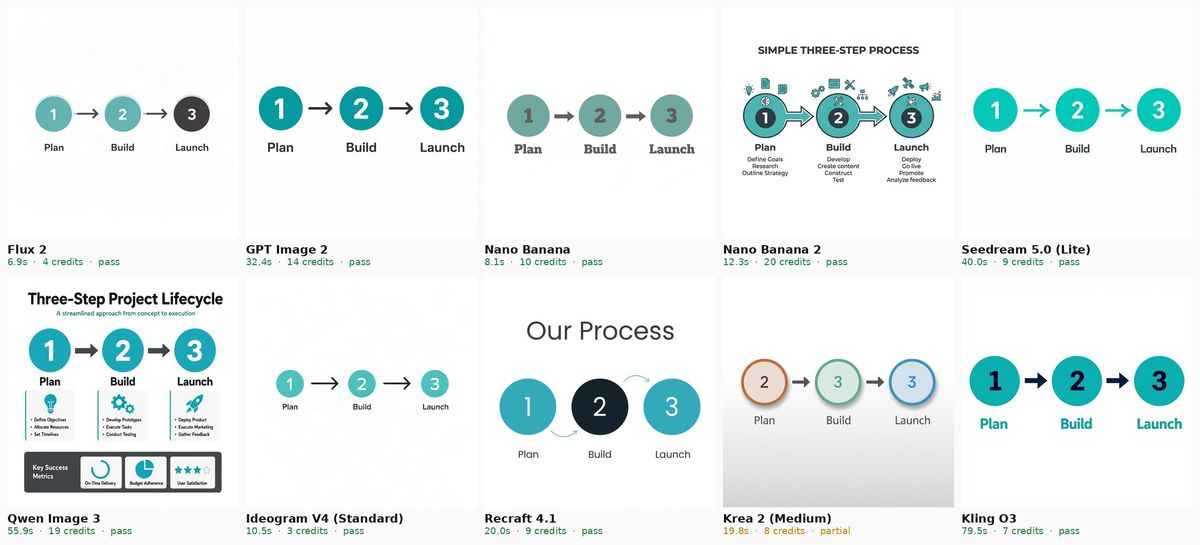
Nine passes. Every model drew three circles in a horizontal row, arrows between them and the labels "Plan", "Build" and "Launch" in a teal and charcoal palette on white. Nano Banana 2, Qwen Image 3 and Recraft 4.1 added a title and, in the first two cases, bullet points under each step that the prompt did not ask for; the requested elements are all correct, so they pass with that note. Krea 2 is the partial: the labels are right but the circles are numbered 2, 3, 3 and the colours drift to orange and blue. For flat diagrams with real words, Flux 2, GPT Image 2, Nano Banana, Seedream 5.0, Ideogram V4 and Kling O3 produced files you could drop into a slide exactly as they are.
What each model is good at
Nano Banana and Nano Banana 2 (Google)
Nano Banana is the most consistent model in the round: no misses, fast, mid priced. Nano Banana 2 is twice the credits and slightly slower; in this test that bought a more polished product shot and a more finished illustration, at the cost of one creative liberty on the poster. Both models are also the ones to reach for when you want to edit an existing image with a text instruction, which Krater supports through the same picker. If you have one model to pick for mixed work, pick Nano Banana.
Flux 2 (Black Forest Labs)
Perfect adherence, 7 seconds an image, 4 credits. Flux 2 is the model we would recommend to anyone who generates in volume: 1,500 Pro credits is about 375 Flux 2 images a month. Its look is slightly cooler and less "produced" than GPT Image 2 or Nano Banana 2, which many people will prefer for photography and fewer will prefer for illustration.
Seedream 5.0 (ByteDance)
The surprise of the round. Six passes, the only 1920 pixel output, and strong text and photography. The price is time: 32 to 79 seconds per image. Use it when the output is going to print or a hero banner and you are not iterating live.
GPT Image 2 (OpenAI)
The best looking poster and the best looking storybook page, plus correct counting and a good product shot. It missed the "both hands visible" instruction in the portrait and is the second slowest model here at 32 to 53 seconds, at 14 credits. It is the model to use when the image is the deliverable and taste matters more than turnaround.
Ideogram V4
Cheapest in the test at 3 credits, fast, and a perfect six of six. The one thing to know is that it interprets loosely on scale: the poster headline was correct but small where the prompt said large. One portrait request was refused by the provider's content filter and went through on retry. For 3 credits it is the obvious drafting model, and good enough to be the final more often than its price suggests.
Qwen Image 3 (Alibaba)
Dense, detailed images and correct text, including a noticeably richer infographic. But it was the slowest model by a wide margin (56 to 99 seconds), returned two provider errors during the run, and is priced near GPT Image 2 at 19 credits. Not the model for iteration.
Kling O3 (Kuaishou)
Good photography and illustration, and a strong poster layout undone by one misspelling. Kling is better known for video; as an image model in this round it is a reasonable 7 credit option for non text work.
Krea 2 and Recraft 4.1
Both finished with two passes and four partials, and for the same reason: they change details you specified. Krea 2 draws good photographs and illustration but held the helmet in one hand, set the poster date in capitals, moved the napkin and misnumbered the infographic. Recraft 4.1 produced the most stylised images in the set, with a graphic, poster like finish, and changed the mug lighting, hid a hand, shrank the fox and stacked the apples. If you want a designer's interpretation of a brief rather than the brief, both are interesting; if you want what you typed, pick from the top of the table.
What the tools cost, per image
Krater bills per image in credits, which makes the cost of one picture from each model explicit: 3 credits for Ideogram V4, 4 for Flux 2, 10 for Nano Banana, 14 for GPT Image 2, 20 for Nano Banana 2, or 4 to 27 cents on the Pro plan. Every model above is in the same $20 a month subscription alongside the chat models. For the standalone tools people usually compare, here is what their own pricing pages said on 23 September 2026.
| Tool | Entry paid plan | What it includes | Source |
|---|---|---|---|
| Krater | Pro, $20 a month | 1,500 credits across all ten models above plus chat, video and voice; images from 3 credits each | krater.ai/pricing |
| Midjourney | Basic, $10 a month ($8 annual) | 3.3 fast GPU hours a month; Standard $30 adds relax mode; stealth mode from Pro at $60; no free tier | docs.midjourney.com |
| ChatGPT (GPT Image) | Plus, $20 a month | Image generation inside chat; OpenAI does not publish image caps per plan | chatgpt.com/pricing |
| Canva | Pro, $144 a year | Up to 200 Premium AI uses a month; image generation is a Premium tool | canva.com/help/ai-access |
| Adobe Firefly | Standard, $9.99 a month | 2,000 generative credits; a standard image is 1 credit | adobe.com generative credits |
| Ideogram (direct) | Plus, $20 a month ($15 annual) | 1,000 priority credits a month; free tier exists with public images | ideogram.ai/pricing |
| Leonardo AI | Essential, $12 a month | 8,500 tokens a month; free tier of 150 tokens a day with public creations | leonardo.ai/pricing |
Two notes on reading that table. First, "credits" mean different things on every service, so compare what you get for a month of typical use rather than the credit number. Second, the free tiers of Ideogram, Leonardo and Midjourney's community feed publish your images by default, which matters if you are making client work. Krater has no free plan; images you generate are private to your account and are not used to train models. We covered the ownership side in detail in who owns AI generated images.
Where the standalone tools are still better
Being honest about the limits of this test: it measures prompt adherence, speed and price for a single square image. It does not measure Midjourney's style system, moodboards and community, which remain the reason many illustrators stay there. It does not measure Canva's or Firefly's advantage when the image is one step in a layout you are already building in that tool. And it does not measure batch generation, fine tuning or local models, which Leonardo, Stable Diffusion and Flux's open weights serve. If your work lives in one of those ecosystems, the right answer may be that tool. If you want the best current models from Google, OpenAI, Black Forest Labs, ByteDance, Alibaba and others in one place, with the cost of each image visible before you generate, that is what Krater's image generator is for.
How to get good results from any of these models
- Write the constraint, not the vibe. "Both hands fully visible" and "exactly three apples in a row on the left" are what separated pass from partial in this test. Adjectives like "beautiful" did nothing.
- Put text in quotation marks and keep it short. Every model that passed the poster prompt did so with two short quoted strings. Long sentences in an image still break.
- Say what should not be there. "No text, no logo" on the mug prompt worked on all ten models.
- Pick the model for the job. Flux 2 or Ideogram V4 for drafts, Nano Banana for the final, GPT Image 2 for typography and illustration, Seedream 5.0 for print sizes.
- Generate two or three, not twenty. At 4 to 14 credits an image, three attempts on a good model is cheaper than twenty on a bad prompt.
Frequently Asked Questions
What is the best AI image generator in 2026?
In our fixed prompt test of ten current models on 27 September 2026, Nano Banana (Google) passed all six prompts with correct text and counting at about 9 seconds and 10 credits an image. Flux 2 matched it on accuracy at 4 credits and 7 seconds, and Seedream 5.0 matched it at 1920 pixel resolution. GPT Image 2 produced the best looking poster and illustration but is slower and pricier.
What is the best free AI image generator?
Ideogram, Leonardo AI and Canva all offer free tiers, with the trade off that free images are public (Ideogram, Leonardo) or limited to a small number of AI uses (Canva, 20 Premium uses a month). ChatGPT's free plan generates images but OpenAI does not publish a cap. Krater does not have a free plan; the Pro plan is $20 a month and includes 1,500 credits, which is roughly 375 Flux 2 images or 150 Nano Banana images.
Which AI image generator is best for text in images?
Eight of the ten models we tested rendered "NORTH SEA JAZZ" and "Rotterdam 10 to 12 July" correctly, so text is no longer rare. GPT Image 2 produced the most attractive typography; Nano Banana, Flux 2, Seedream 5.0, Qwen Image 3, Recraft 4.1 and Ideogram V4 were also exactly right. Kling O3 misspelled the city, and Nano Banana 2 and Krea 2 switched the date line to capitals. All ten got the three infographic labels right.
Which AI image generator follows prompts most accurately?
Nano Banana, Flux 2, Seedream 5.0 and Ideogram V4 followed every stated element in all six of our prompts, including "both hands visible", "exactly three apples in a row on the left" and specific text. Recraft 4.1 and Krea 2 were the least literal, each changing or dropping a stated element in four of six prompts.
Which AI image generator is fastest?
Flux 2 at a median of 7.3 seconds per 1024 pixel image, then Nano Banana at 9.2 seconds and Ideogram V4 at 11.0 seconds, all measured through the Krater API on 27 September 2026. GPT Image 2 (39 s), Seedream 5.0 (46 s) and Qwen Image 3 (82 s) were the slowest.
How much does an AI image cost?
On Krater's Pro plan one credit is about 1.3 cents, so an image costs between 4 cents (Ideogram V4, 3 credits) and 27 cents (Nano Banana 2, 20 credits), with Flux 2 at about 5 cents and Nano Banana at 13 cents. Standalone tools price differently: Midjourney sells GPU time from $10 a month, Firefly sells credits from $9.99 for 2,000, Canva counts AI uses within its Pro plan.
Can I use AI generated images commercially?
Generally yes under the terms of the major tools, with conditions that differ by service: Midjourney requires a paid plan for commercial use and publishes images by default below its Pro tier, and several free tiers make your images public. On Krater your images are private to your account, Krater claims no rights in them and does not use them to train models; the underlying model providers' terms also apply. Whether the image is protected by copyright is a separate legal question that depends on your country and your creative input. See our guide on selling AI generated art.
Why does an AI image generator ignore part of my prompt?
Spatial and count instructions are the most commonly dropped, as our counting prompt showed: models get "three apples" right and "in a row on the left" wrong. Long prompts with many elements also dilute each instruction. Put the hard constraint in plain words near the start, keep quoted text short, and switch to a model that passed the equivalent test above.
Related reads
- Who owns AI generated images? ChatGPT vs Midjourney vs Gemini vs Canva vs Krater
- Can you sell AI generated art?
- Krater image generator: every model in this test in one picker
- How we test models
Bottom Line
Ten current image models, six identical prompts, sixty images, one afternoon. Four models did not miss anything: Nano Banana is the pick if you want one model for everything, Flux 2 if you care about speed, Ideogram V4 if you care about price, Seedream 5.0 if you need resolution. GPT Image 2 makes the prettiest pictures and charges you in time for it. Every output is above, unedited, with its model, time and price, so you can disagree with our labels and still use the evidence. We will rerun the same six prompts when these models change and update the date at the top.