


Best AI for Spreadsheet Formulas: 8 Models Tested
A focused comparison of AI models for spreadsheet formulas, with the exact business brief, real answers and practical review steps.
Tested: September 2026

Key Takeaways
- The spreadsheet formula task is a narrow test of a formula that filters SKU and dates, multiplies units by price and includes new rows, not a general measure of intelligence. GPT-6
- The higher and lower examples below show the difference more clearly than a score alone. Read the answer against the brief, then read the review note for the constraint that change
- Use GPT-6 Astra as the first model to test for a formula that filters SKU and dates, multiplies units by price and includes new rows, then compare it with one other model on the ex
- Read the output against the original brief line by line. Check names, numbers, dates, owners and the requested format before improving the prose. A polished answer that changes one
- A single task cannot represent every workbook, meeting or agreement. The benchmark uses a fixed English brief, three runs and default reasoning settings, so it is evidence for a sh
- A model comparison has lasting value when it becomes a review habit. Save the brief, the accepted answer and the correction that mattered. The next person can then start with the b
The brief behind the score
The spreadsheet formula task is a narrow test of a formula that filters SKU and dates, multiplies units by price and includes new rows, not a general measure of intelligence. GPT-6 Astra leads this task at 100.0, but the details in the brief explain why the ranking matters to an operator.
Spreadsheet formula
Brief: Give me a single Google Sheets formula for cell G2 and explain it in at most 3 sentences. The formula must work if new rows are added below.
Input: Sheet 'Orders' has a header in row 1 and data from row 2 down: A: order date (real dates), B: SKU (text), C: units (number), D: unit price (number), E: country (text) G2 should show total revenue (units times unit price) for SKU "BK-101" for orders dated in August 2026, all countries.
The point of this brief was not to reward a general essay. It asked for a particular format, a particular length and careful use of the supplied facts.
The strongest answers used an open range and handled the date boundary without a helper column. The useful question for a team is whether the formula still works after a new row arrives, not whether it looks clever.
Two answers worth studying
The higher and lower examples below show the difference more clearly than a score alone. Read the answer against the brief, then read the review note for the constraint that changed the outcome.
| Example | Output and review |
|---|---|
| Higher-scoring example Claude Fable 5.1, run 1 | `=SUMPRODUCT((Orders!B2:B="BK-101")*(Orders!A2:A>=DATE(2026,8,1))*(Orders!A2:A<DATE(2026,9,1))*Orders!C2:C*Orders!D2:D)` SUMPRODUCT multiplies units by unit price row by row and only keeps rows where the SKU is "BK-101" and the date falls between 1 Aug 2026 and 31 Aug 2026 inclusive. The open-ended ranges (B2:B, A2:A, etc.) automatically cover any new rows added below, and blank rows contribute zero. Country is not referenced, so all countries are included. Review note: The formula correctly totals units times price for BK-101 orders in August 2026 across all countries, includes future rows through open-ended ranges, and is explained in exactly three sentences. |
| Lower-scoring example DeepSeek V4 Pro, run 2 | Formula for G2: `=SUMPRODUCT((B:B="BK-101")*(MONTH(A:A)=8)*(YEAR(A:A)=2026)*(C:C)*(D:D))` How it works: SUMPRODUCT multiplies four logical arrays across the entire columns - one each for matching the SKU, the month, and the year - by the units and unit price columns, then sums only the rows where all conditions are true. Because it references whole columns (e.g., B:B), it automatically includes any new rows added below. The formula ignores the header row since its text values fail the numeric or text-match conditions. Review note: The formula uses full column references (A:A, C:C) which will result in a #VALUE! error in Google Sheets because multiplying the text headers in row 1 by the boolean arrays causes an error; it should have used open ranges like A2:A. |
A workflow for the result
Use GPT-6 Astra as the first model to test for a formula that filters SKU and dates, multiplies units by price and includes new rows, then compare it with one other model on the exact source material your team uses. Keep the prompt narrow, ask for the requested format and make the final review visible.
In Krater, pick the model in the model picker and use Compare for a side by side check. Save the audience, format, source rules and approval standard in a Persona when the work repeats. The benchmark points to a starting model; it does not remove the need to inspect the actual output.
What to check before you ship the answer
Read the output against the original brief line by line. Check names, numbers, dates, owners and the requested format before improving the prose. A polished answer that changes one of those details is less useful than a plain answer that preserves them.
Run one small test that would expose the likely mistake. Add a new spreadsheet row, read the action table against the transcript or compare every contract date with the clause. Keep the test result with the approved output.
When a source is incomplete, require the model to say what is missing. The reviewer should be able to tell the difference between a supplied fact, a reasonable interpretation and an open question.
Where the benchmark stops
A single task cannot represent every workbook, meeting or agreement. The benchmark uses a fixed English brief, three runs and default reasoning settings, so it is evidence for a shortlist rather than a promise about every business workflow.
The model still needs a source that is complete enough to review. Better prompting cannot repair a missing policy, an absent deadline or a clause that was copied without its definitions and schedules.
Use the result to choose what to test next. Keep the final decision with the person who owns the workbook, meeting, customer promise or contract review.
Turn the result into a team habit
A model comparison has lasting value when it becomes a review habit. Save the brief, the accepted answer and the correction that mattered. The next person can then start with the business rule instead of a blank prompt.
Use a Persona for recurring context and a Task for the review date. Keep the final source in the system that owns it, then use Krater to prepare the summary, question list or handoff around that source.
When the brief changes, rerun the comparison. A new policy, workbook layout or contract schedule can change which model is easiest to approve even when the benchmark score remains unchanged.
Make the reviewer visible
Name the person who approves the answer and the source they should use. A clear owner prevents a formula, action list or clause summary from circulating without anyone responsible for the final check.
Record the correction when the reviewer finds one. That note improves the next prompt and gives the team a practical example of the standard it expects.
A formula is a small program
Treat a formula like a small program with inputs, conditions and an expected result. Name the columns, make the date boundaries explicit and avoid a fixed last row when the sheet will grow.
A formula review should include one known total and one deliberately excluded row. If the result changes for the wrong reason, the operator can trace the condition before the formula reaches a monthly report.
The best spreadsheet workflow leaves the formula and its explanation together. That makes the next review faster and helps the team update the rule when the business definition changes.
If the sheet serves several teams, include the business definition beside the formula. A future analyst should know whether revenue means booked, paid or shipped before comparing the total.
That small note prevents a correct formula from answering the wrong question. It also gives a reviewer a clear place to challenge the definition before changing the calculation.
For a shared workbook, add the accepted formula to the team's reference sheet and link the test case. That makes the next change deliberate rather than accidental.
The chart and the decision
The selected work covers spreadsheet formula. The chart is useful because it keeps the recommendation tied to those jobs instead of turning the overall ranking into a universal rule.
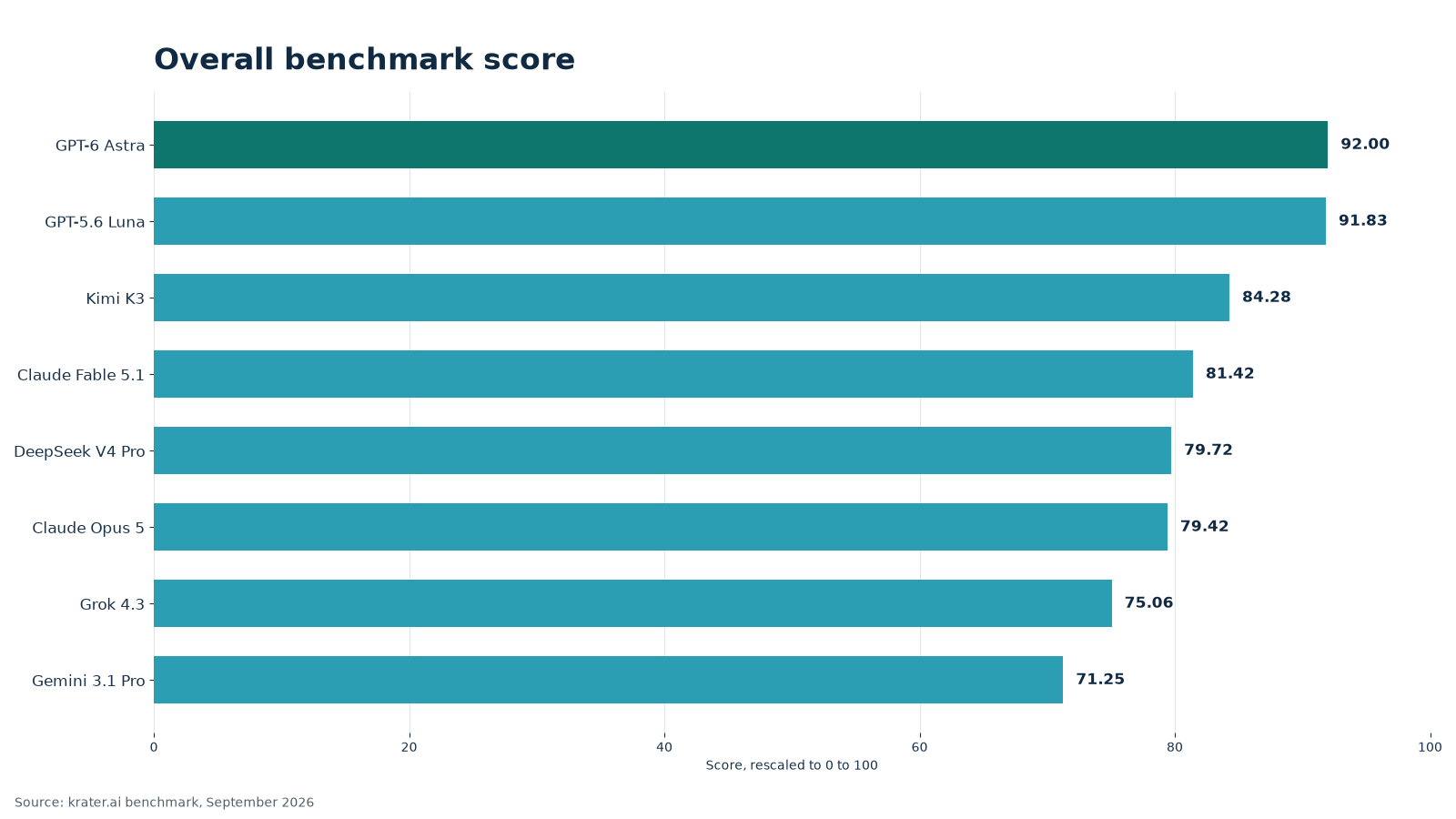
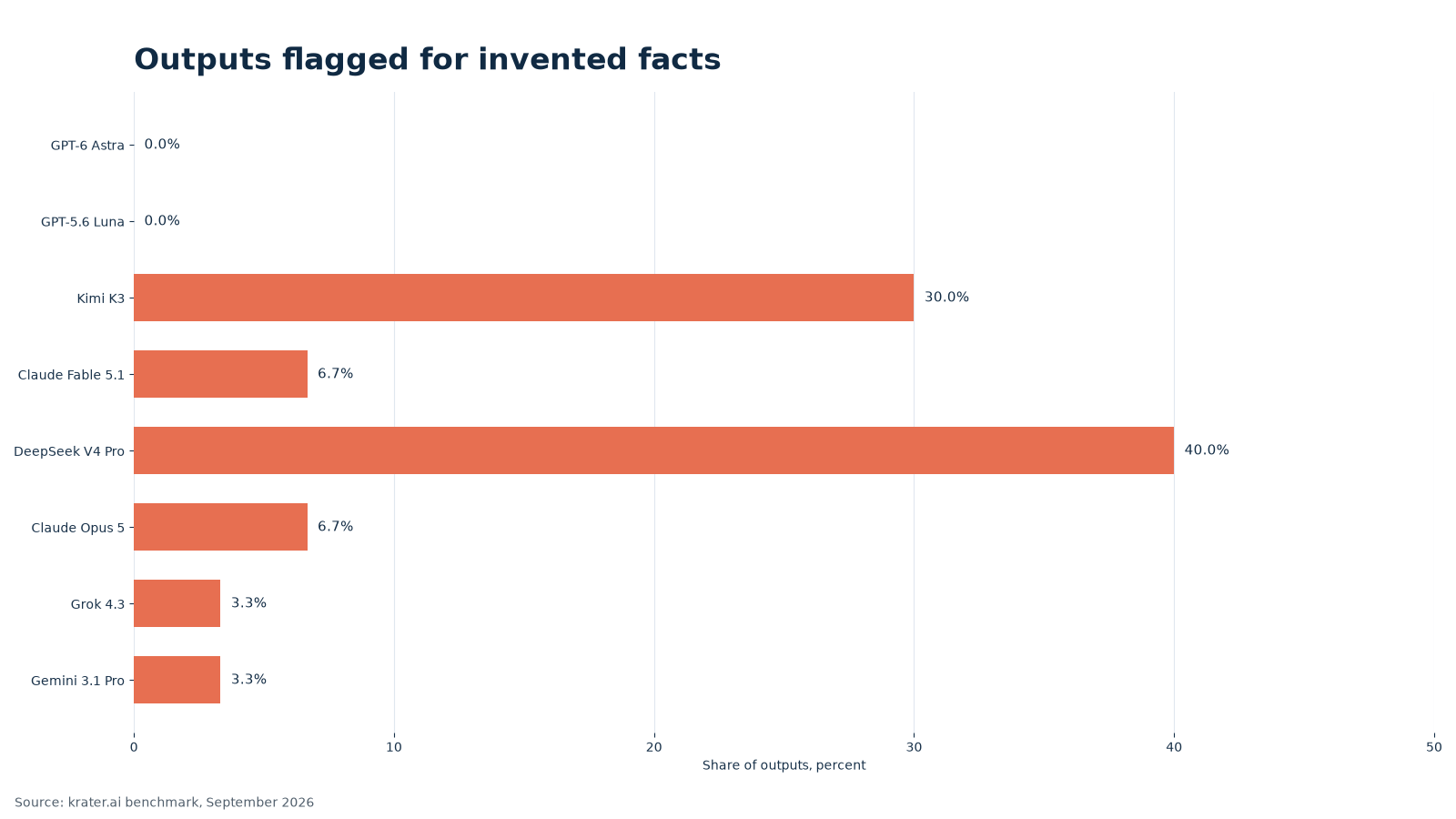
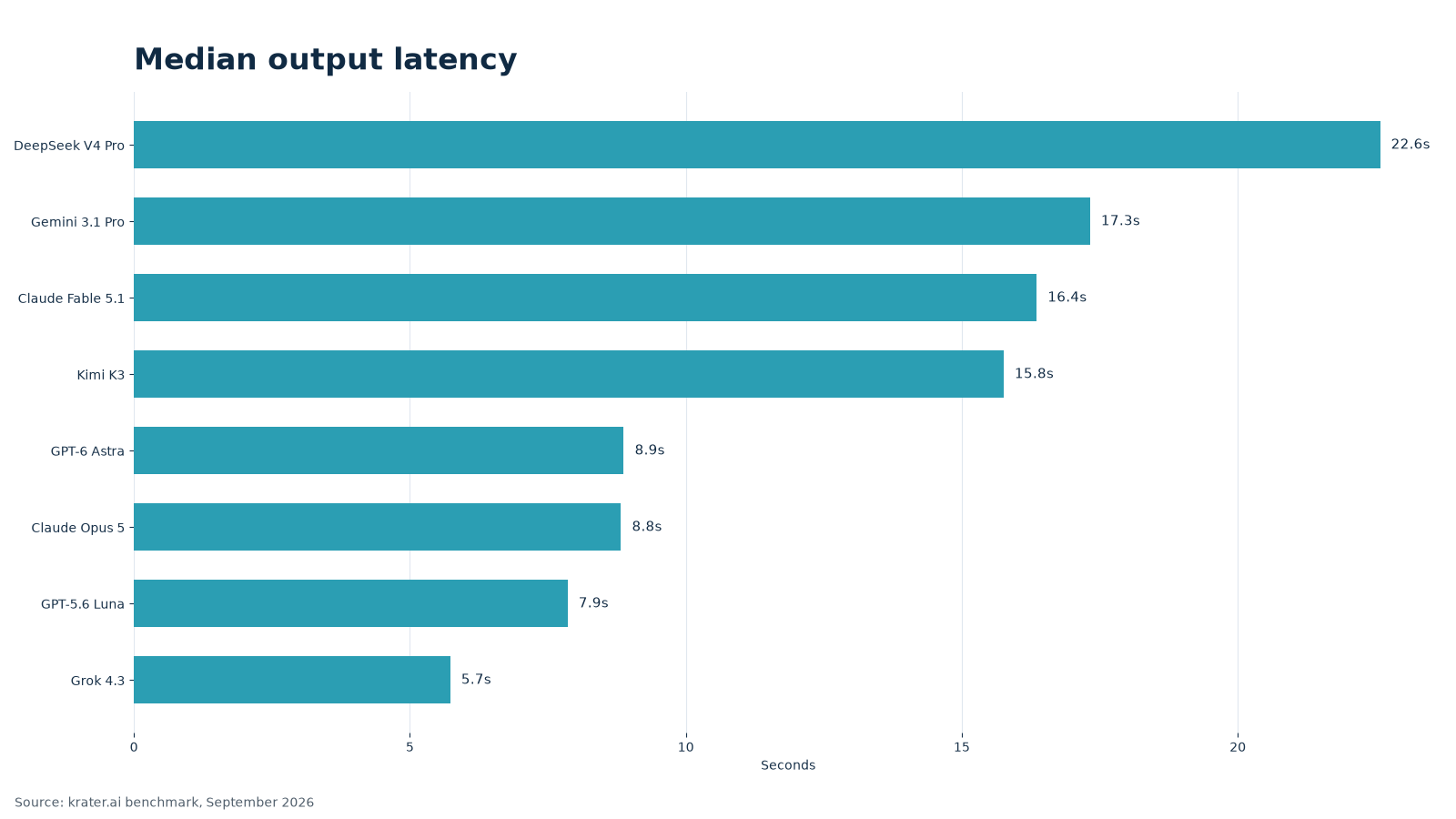
Use the winner as the first comparison, then check the runner-up on a real brief. A model that loses a few points may still be the better operational fit if it follows your house format with less editing.
A repeatable workflow
How to use this in Krater
The benchmark is a shortlist, not a reason to hand every job to one model. Pick a candidate in the model picker, then use Compare to run the same brief side by side. Look at the facts that survived, the format that came back and how much editing remains.
When the work repeats, create a Persona with the audience, house style, prohibited claims, approval rules and output format. Keep the source material in Keep and assign review work in Tasks. Krater provides 500+ models, so a team can keep one dependable choice for important work while testing another for a different format or turnaround.
Useful commands for this kind of work include /research, /summarize, /document, /image. Use them to organize source material, turn long notes into a brief, create a structured deliverable or prepare a visual direction. The operator still approves the final output.
Method and limits
The test covers 10 business tasks, 3 runs per model and a generation temperature of 0.7. The briefs cover Product description, Amazon listing bullets, Meta ad variants, Customer support reply, SEO title and meta description, Abandoned cart email sequence, Spreadsheet formula, Contract clause summary, Meeting notes to action items, Product photo prompt. Three independent judges were used: GPT-6 Astra, Claude Opus 5, Gemini 3.1 Pro. They did not see the name of the model they were reviewing, and a judge was left out when it came from the same company as that model. Each response was scored on 5 criteria from 1 to 5: correctness, brief, usefulness, clarity, ship_ready. The mean was rescaled to 0 to 100, then averaged across runs and tasks. For the workflow side of this, see our guide to AI personal assistants for business.
This is a focused view of 1 task scores inside a 10-task comparison. AI judges, English prompts, one month and default reasoning settings all shape the result. Treat it as evidence for a shortlist, then test the briefs that matter to your team.
Frequently Asked Questions
Which model leads for spreadsheet formulas?
GPT-6 Astra leads this group at 100.0. That is a useful starting point, but your own facts and approval rules should decide the final choice.
Are these quality scores the same as usage popularity?
No. The scores come from controlled business briefs. Usage popularity is covered separately in the usage article.
Why can a high-scoring answer still need editing?
A response can follow the facts and still need a warmer tone, tighter format or a final brand review.
How do I stop a model inventing product details?
State what the source does not say, require source-only claims and check every named feature before publishing.
How can I compare models on my own work?
Pick two models in Krater, run the same brief in Compare and save the approved instructions in a Persona.
How many models are available in Krater?
Krater provides 500+ models across text, research, image, video, voice and other workflows.
The Bottom Line
For spreadsheet formulas, start with GPT-6 Astra, compare it with GPT-5.6 Luna and keep the source facts visible through review. The best choice is the one your team can approve and ship without risky additions. We go deeper on this in our guide to AI spreadsheet generators.