

How to Share a Claude Chat (And Claude Projects)
Claude chats share as read-only links in two steps, and Claude Projects only share inside Team or Enterprise workspaces. What each option does.
Share a Claude chat
- Open the conversation on claude.ai or in the Claude app.
- Click Share at the top of the chat.
- Copy the link Claude creates and send it.
The page your recipient opens is read-only. They can read the shared conversation in the browser without signing in, but there is no reply-inside mode: if they want to keep chatting, it happens in their own Claude account, on their own copy.
Can you share a Claude Project?
Only on Team and Enterprise plans. There, a project can be shared with workspace members so colleagues see its chats and project knowledge. On Free and Pro plans there is no project sharing at all: the workaround is sharing chats one by one, which loses the project knowledge and files that made it a project.
If you need to share a project or an editable chat
Two gaps land in the same place. First, nobody can reply inside a shared Claude chat. Second, sharing a whole project with its files and instructions is locked to workspaces. On Krater, an invite link set to Can edit lets the other person post inside the same thread, and a shared project carries every conversation, file and memory inside it, on individual plans too.
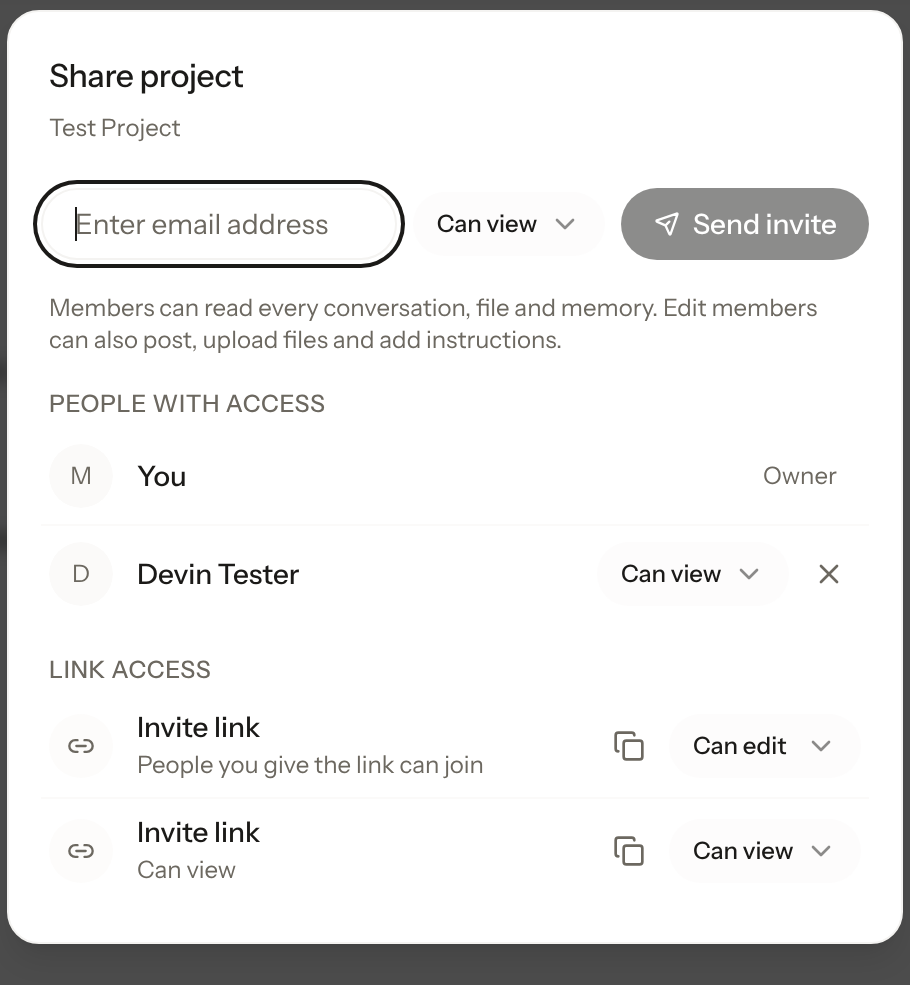
To share on Krater: open a conversation or a project, click Share, then invite by email or create an invite link set to View or Edit. For a finished result you only want people to read, turn on the public link and send a snapshot that opens with no sign-in, the same kind of read-only page a Claude share link produces. The full walkthrough is on the sharing feature page.
More guides: sharing in every AI app, share a ChatGPT conversation, share a Gemini chat, share a Grok conversation.
FAQ
Does someone need a Claude account to open a shared chat? No. A Claude share link opens as a read-only page in the browser. An account is only needed if they want to continue the conversation themselves.
Can I share a Claude Project on the Pro plan? No. Project sharing is limited to Team and Enterprise workspaces. On Pro or Free, share chats individually instead.
Can a recipient edit or reply inside my shared Claude chat? No. Claude share links are read-only, and continuing the conversation happens in the recipient's own copy. Replies inside the same thread need an edit invite link, which Krater supports.
How do I stop sharing a Claude chat? Open the Share menu on the conversation and delete the link. Everyone holding the URL loses access.
Checked 3 October 2026 on claude.ai and Anthropic's sharing and Projects documentation.