


AI Project Management in 2026: What It Is and How to Actually Use It
AI project management is two layers: boards with AI features and the workspace where the work happens. What each does and how to set it up.

What AI project management actually means
The term covers two very different things, and confusing them is why most articles on this topic feel thin:
- The board layer. Task tools like Asana, ClickUp, Motion, Notion and Trello add AI that writes task descriptions, summarizes comment threads and autocompletes fields. Useful, but it is an assistant bolted onto a tracker.
- The work layer. Where the project is actually figured out: the chats, briefs, uploaded files, decisions and instructions. For most teams this layer lives in a general AI chat, disconnected from the board.
Real AI project management is the second layer done properly: the AI knows the project context, keeps it across every conversation, and automates the recurring admin work around it.
The two layers, side by side
| Board layer (Asana, ClickUp, Motion) | Work layer (Krater) | |
|---|---|---|
| What it tracks | Tasks, assignees, due dates | Plans, decisions, files, running context |
| What the AI does | Writes task text, summarizes threads | Drafts plans, answers from project files, runs scheduled check-ins |
| Models | The vendor's built-in assistant | 500+ models: GPT, Claude, Gemini and more in one thread |
| Sharing | Team seats inside the workspace | View and edit invites, public snapshots, shared projects |
What AI can already do in project management
- Draft the plan. Paste a brief, get a phased plan with milestones and dependencies in seconds, then argue with it until it is right.
- Turn conversations into tasks. A planning chat becomes a checklist; meeting notes become action items.
- Write the status update. The recurring admin work, weekly digests and client summaries, is exactly what scheduled prompts are for.
- Answer questions against project documents. Upload the brief, contract and roadmap once; every chat in the project can draw on them.
- Flag what is blocking work. With the right instructions, the AI surfaces blockers and dependencies first instead of burying them.
What AI cannot do
Be skeptical of any tool that claims otherwise:
- Judgment under ambiguity. Which deadline to slip, which stakeholder to disappoint, which scope cut is safe: that is still a human call.
- Accountability. An AI cannot own an outcome or sit in the hard conversation.
- Politics and relationships. Reading a room, managing a difficult client, motivating a tired team. Not yet, probably not ever.
- Truth about your schedule. AI drafts a plan; reality checks it. Keep a human reviewing it.
Setting up an AI-managed project on Krater
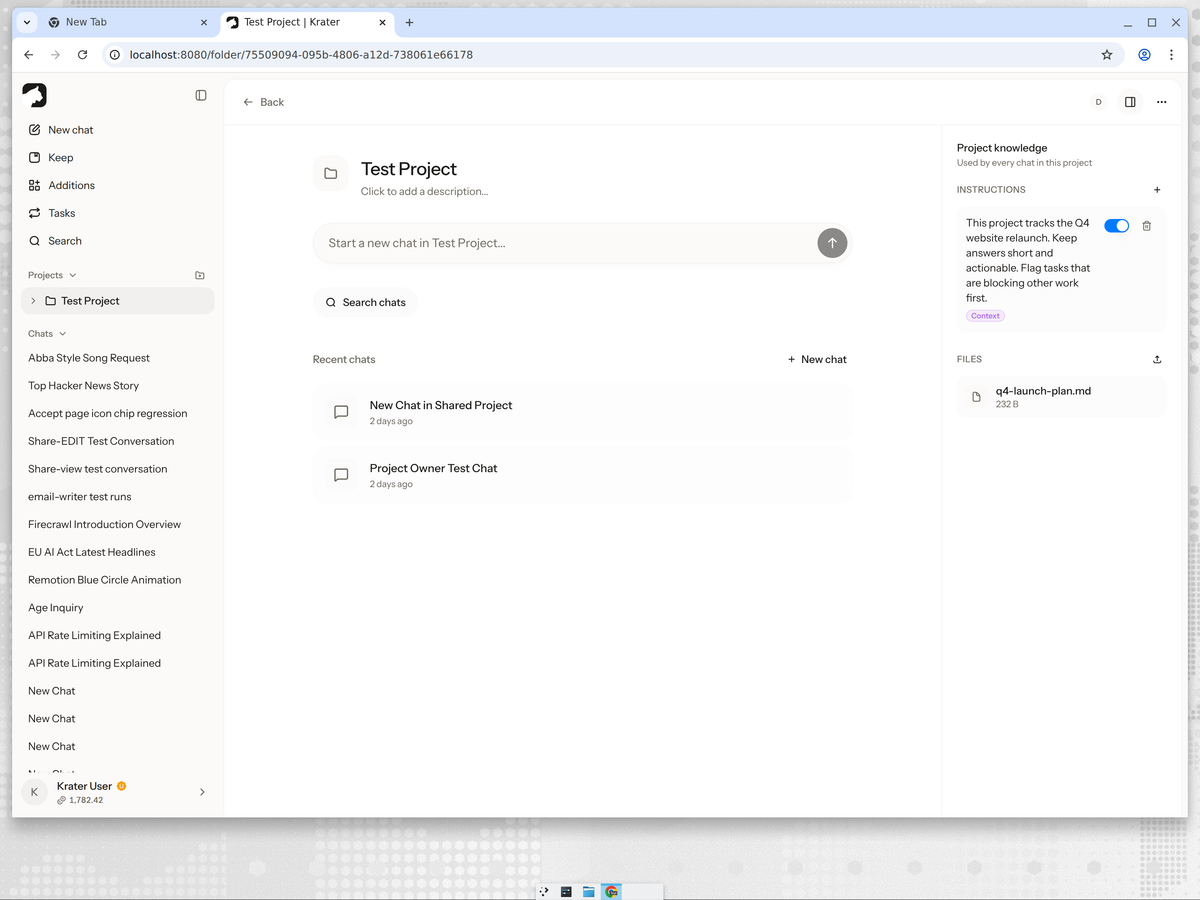
On Krater the work layer is a Project: a container where every chat shares the same instructions, files and context. Setup takes about two minutes:
- Create a project and name it after the engagement or product.
- Under Project knowledge, add instructions: what the project is, how the AI should behave, what to flag first.
- Upload the reference files: briefs, plans, contracts, specs. Every chat in the project can use them.
- Keep all project chats inside the project so context stays in one place.
Automating the recurring work
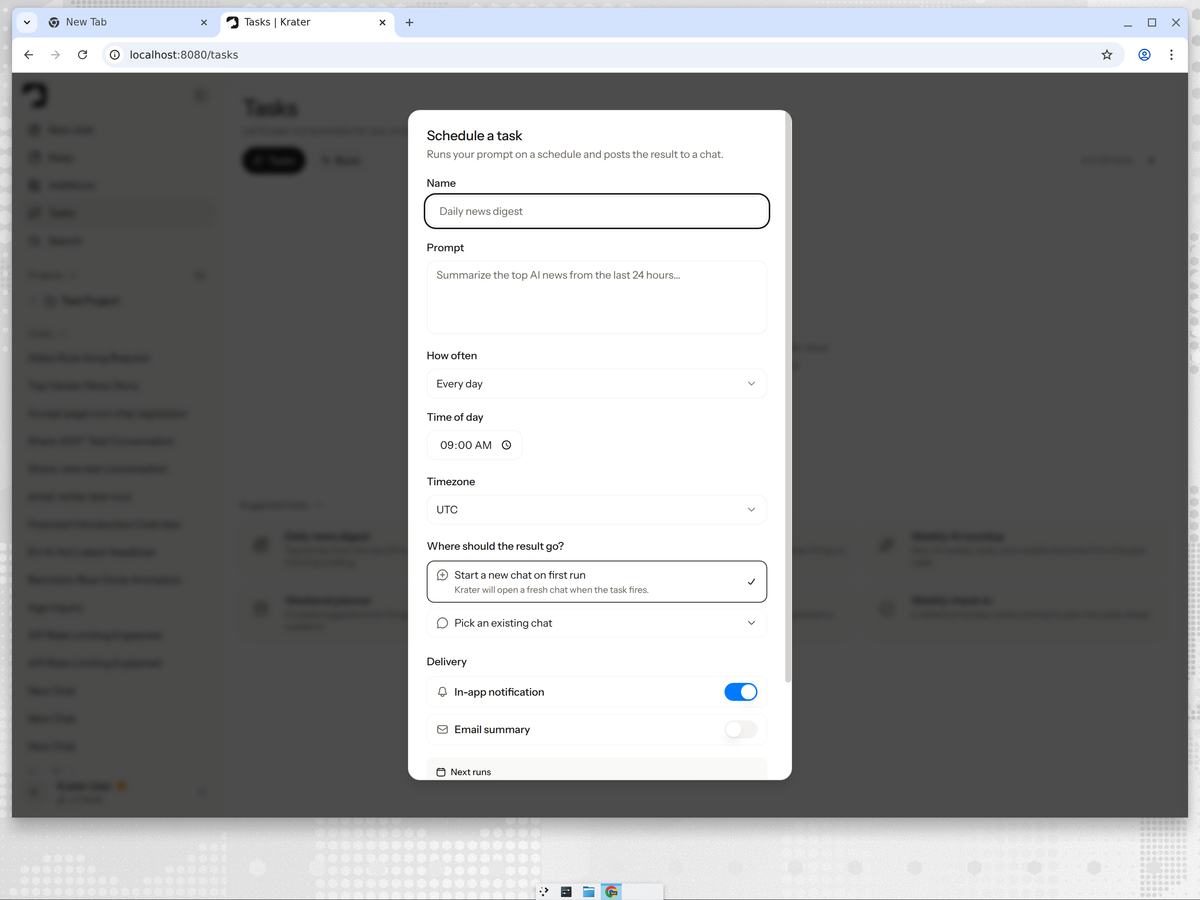
Krater Tasks are scheduled prompts: pick a prompt, a cadence and a destination, and Krater runs it for you. For project work the useful ones are the recurring check-ins: a Monday status digest that posts into the project chat, a Friday risk review, a weekly client summary drafted for you to send.
Bringing clients and collaborators inside
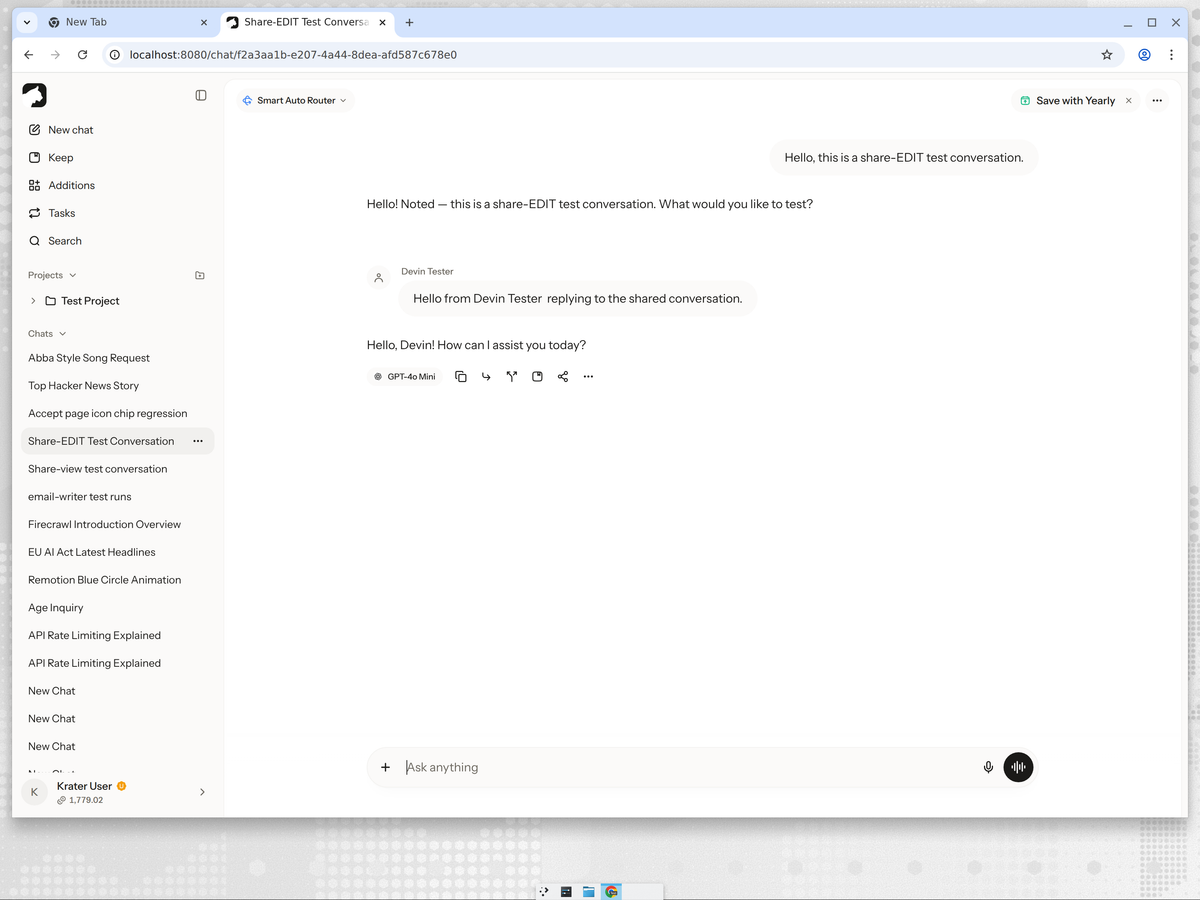
The part no board tool can copy: share the actual AI conversation. An edit invite lets a collaborator post inside the same thread, so feedback happens where the work is, not in a parallel email chain. Shared projects go further: members see every chat, file and instruction, and can add their own.
The honest limits
Krater is not a kanban board: there are no drag-and-drop cards, Gantt charts or sprint reports. If your project needs ticket tracking, pair the work layer with a board, or keep the board as the source of truth for task status. What Krater replaces is the scattered part: the AI chats, the pasted docs, the forgotten context, the status update you write from scratch every Friday.
More guides: the best AI project management tools compared, AI project management for freelancers, the best AI workspaces, what real AI collaboration looks like, and sharing chats and projects on Krater.
FAQ
Can AI do project management? Partly. AI handles the administrative layer well today: drafting plans, summarizing meetings, writing status updates, answering questions from project documents. It does not replace judgment, prioritization or accountability, so the honest answer is that AI does the admin while the project manager does the managing.
What is the 30% rule for AI? There is no official rule, but the popular idea is that roughly a third of knowledge work is automatable today. In project management that maps neatly onto status reports, meeting notes, scheduling and first-draft documents: the admin that eats a PM's week. The remaining two thirds, judgment and people work, stays human.
Will project managers be phased out by AI? Unlikely. The role shifts away from chasing status and writing updates toward decisions, trade-offs and stakeholder management. PMs who use AI for the admin layer simply have more hours for the work that matters.
Who are the big 4 AI agents? Usually it means the four general-purpose assistants: ChatGPT, Claude, Gemini and Copilot. On Krater you can use all four, plus hundreds more models, inside a single project without switching apps.
Is AI project management software worth it? If your week includes writing status updates, summarizing meetings or re-explaining project context, yes. Start with the work layer rather than a new board: that is where the hours actually go.
Checked on 3 October 2026 against Krater's current feature set and each tool's public documentation.
More guides: Best AI collaboration tools.