

/document — Create Documents
Create and edit documents /document writes long form documents into the Document panel — a rich text editor that opens beside your chat. Use it for essays, reports, proposals, letters, and anything...
Create and edit documents
/document writes long-form documents into the Document panel — a rich-text editor that opens beside your chat. Use it for essays, reports, proposals, letters, and anything you want to refine and export.
Cost: Billed on output tokens at your selected chat model’s rate — from 3 credits on the default model. Longer documents and pricier models cost more.
How to Use
Type /document followed by what you want written:
/document Write a professional cover letter for a software engineer position
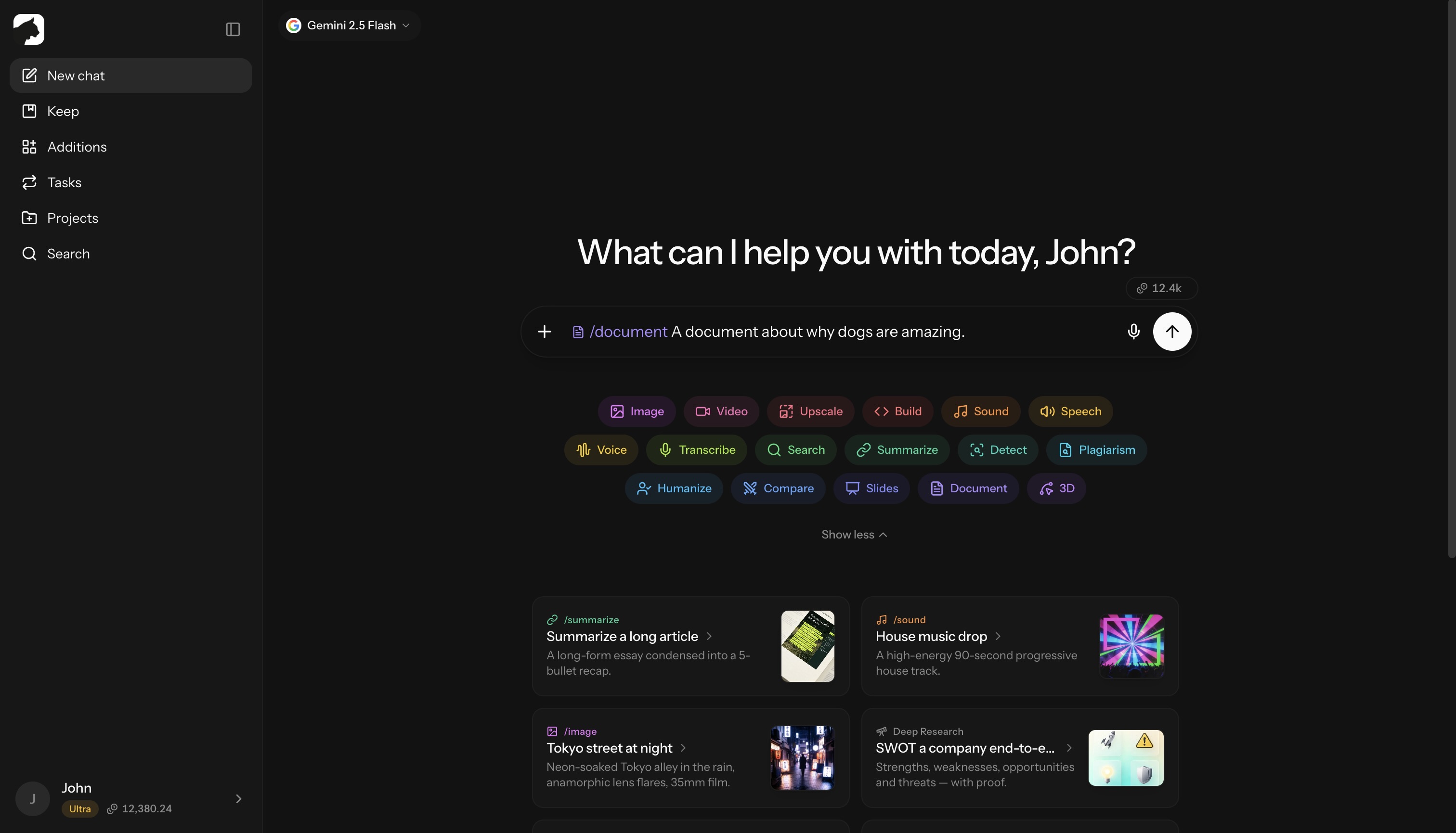
/document Create an executive summary for a Q3 sales report
/document Draft a blog post about sustainable living tips
The document streams into the panel live — you watch it being written.
What You Can Create
Professional Documents
- Cover letters
- Business proposals
- Executive summaries
- Meeting agendas
- Project briefs
Academic Writing
- Essays and papers
- Research summaries
- Literature reviews
- Study guides
Content
- Blog posts
- Articles
- Newsletters
- Social media content plans
Personal
- Letters
- Personal statements
- Creative writing
- Speeches
The Document Panel
When you use /document, Krater opens an editor panel next to the conversation where you can:
- Watch it write — the draft streams in live with a “Krater is writing…” indicator
- Edit directly — click anywhere and type; the panel auto-saves
- Format richly — headings, bold, italic, strikethrough, inline code, bullet and numbered lists, blockquotes
- Navigate versions — every significant change is versioned; step back and forward through the history
- Review changes — a diff view shows before/after with added and removed sections highlighted
- Switch documents — multiple documents in one chat live in a dropdown; click the title to rename
- Export — copy to clipboard or download as
.md,.txt,.html, or.docx
The panel is resizable on desktop and full-screen on mobile.
Features
| Feature | Description |
|---|---|
| Live streaming | The draft appears as the model writes it |
| Rich editor | Headings, lists, bold, italics, code, quotes |
| Version history | Navigate between saved versions |
| Diff view | Compare before/after for AI edits |
| AI refinement | Ask for changes in chat or rewrite a selection |
| Export ready | .md, .txt, .html, .docx, or copy |
Example Prompts
Professional:
/document Write a project proposal for implementing a new CRM system, including timeline and budget estimates
Academic:
/document Create a 500-word essay on the impact of social media on modern communication
Creative:
/document Write a short story about a robot discovering emotions, 1000 words
Business:
/document Draft a quarterly business review template with sections for KPIs, challenges, and next steps
Iterating on Documents
Refine a document two ways:
- In chat — follow-up messages edit the document in place. Each AI edit is versioned, and you can inspect exactly what changed in the diff view.
- On a selection — highlight text in the panel, choose AI Iterate, and describe the change (“How should I change this?”). Only that section is rewritten.
Useful follow-ups:
- “Make the introduction more compelling”
- “Add more specific examples in section 2”
- “Shorten this to 300 words”
- “Make the tone more casual”
- “Add bullet points for the key benefits”
Saved to Keep
Finished documents auto-save to Keep as document files. Open one from Keep to jump back into its conversation with the panel reopened — no separate export step needed to keep your work.
Tips for Great Documents
| Tip | Example |
|---|---|
| Specify length | “Write a 500-word article” |
| Define tone | “Professional but friendly” |
| Include context | “For a tech-savvy audience” |
| Request structure | “Include intro, 3 main points, conclusion” |
/document uses whichever chat model you have selected — pick a stronger model for harder writing tasks, or let the Auto Router choose.
/document vs Regular Chat
| Feature | /document | Regular chat |
|---|---|---|
| Formatted output | Rich-text editor | Markdown in the message |
| Version history | Yes | No |
| Diff view of edits | Yes | No |
| Selection rewrites | Yes | No |
| Dedicated panel | Yes | No |
| Export formats | .md, .txt, .html, .docx |
Copy manually |
| Saved to Keep | Automatic | Manual |
Use /document when you need polished, editable content you can refine and export. For quick answers and short text, regular chat is enough.
Related
- /slides — Create Presentations for slide decks
- /build — Apps and Websites for interactive artifacts
- Keep — File Storage for managing saved documents
More in Slash Commands
- /image — Generate & Edit Images
- /video — Create Videos
- /upscale — Upscale Images & Video
- /build — Generate Apps, Sites & Code
- /sound — Music & Sound Effects
- /tts — Text to Speech
- /voice — AI Voice Transformation
- /transcribe — Transcribe Audio & Video
- /research — Research
- /summarize - Summarize URLs, Videos & Files
- /detect — AI Detection
- /plagiarism — Check Plagiarism
- /humanize - Make AI Text Natural
- /compare — Compare AI Models
- /slides — Generate Presentations
- /3d — Generate 3D Models