

/tts — Text to Speech
Convert text to natural speech The /tts command turns your text into spoken audio with ElevenLabs voices. Pick a voice, a language, and a speed, and Krater returns audio you can play in chat or dow...
Convert text to natural speech
The /tts command turns your text into spoken audio with ElevenLabs voices. Pick a voice, a language, and a speed, and Krater returns audio you can play in chat or download as an MP3.
How to use
Type /tts followed by your text:
/tts Welcome to our podcast! Today we're exploring the future of AI.
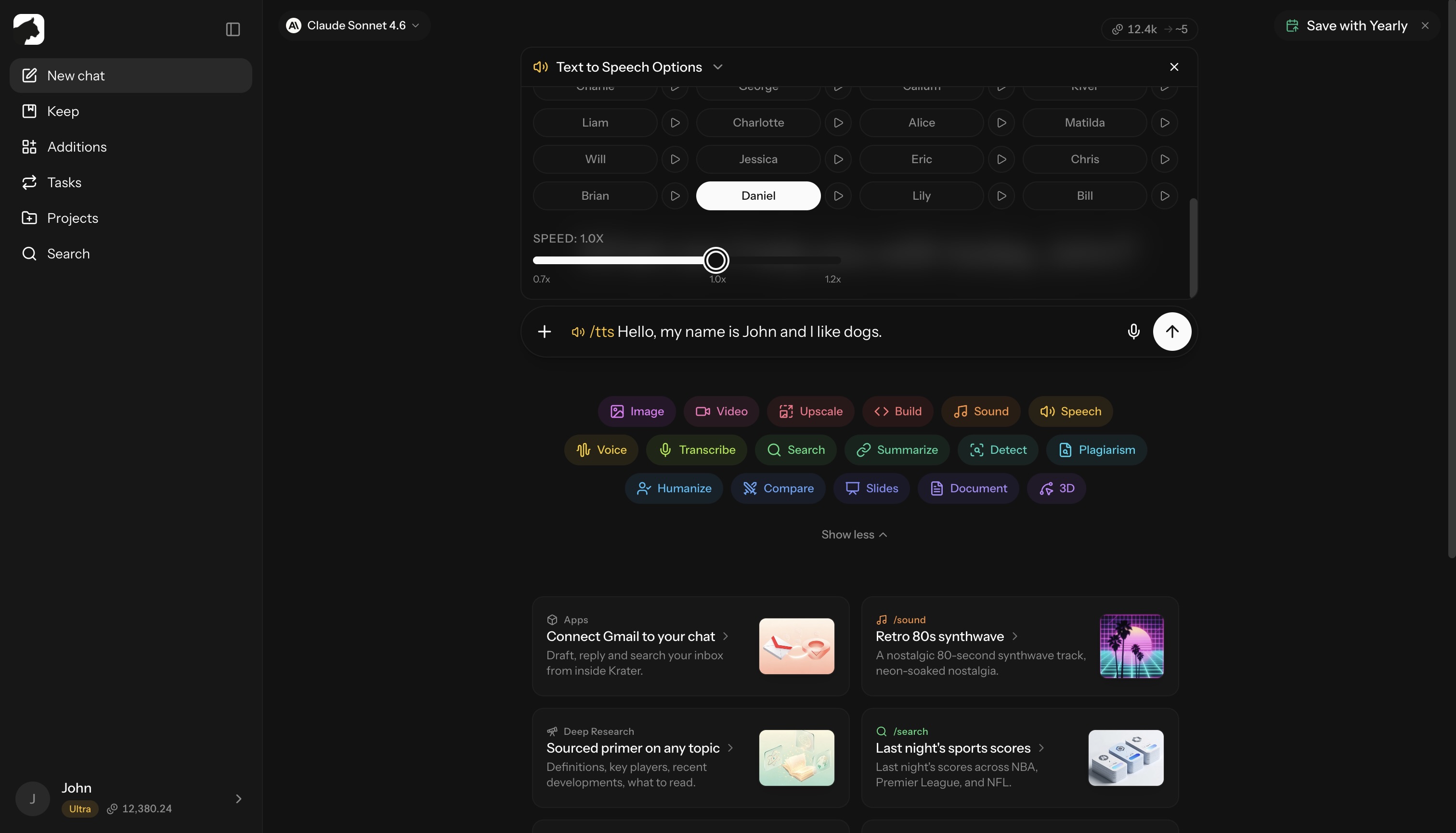
Options
The options panel gives you three controls:
| Option | What it does |
|---|---|
| Language | Auto-detect, or force one of 32 languages for native pronunciation |
| Voice | 20 preset voices, or a custom ElevenLabs Voice ID |
| Speed | 0.7x to 1.2x in 0.1 steps (default 1.0x) |
Preset voices
Female: Aria, Sarah, Laura, Charlotte, Alice, Matilda, Jessica, Lily
Male: Roger, Charlie, George, Callum, River, Liam, Will, Eric, Chris, Brian, Daniel, Bill
Aria is selected by default.
Custom voices
Switch the voice selector to Custom ID and paste any ElevenLabs Voice ID to use a voice from the ElevenLabs Voice Library instead of a preset.
Preview voices
Click the play button next to a preset voice to hear a free sample, spoken in the language you selected. Click again to stop.
Long text
/tts accepts up to 40,000 characters, roughly 40 minutes of audio. Anything over 10,000 characters is generated in the background, and the finished audio lands in your chat when it is ready.
Use cases
- Podcasts — narration and intros
- Videos — voiceovers
- Audiobooks — long-form reading, with background generation for full chapters
- Presentations — professional spoken tracks
- Accessibility — text-to-audio conversion
- Language learning — pronunciation practice in 32 languages
Tips for natural speech
Use punctuation for pacing:
- Commas create short pauses
- Periods create longer pauses
- Ellipses (…) create thoughtful pauses
Emphasize with caps sparingly:
- “This is REALLY important” adds emphasis
Credits
/tts costs 10 credits per 1,000 characters, with a 10-credit minimum.
| Text length | Cost |
|---|---|
| Up to 1,000 characters | 10 credits |
| 2,000 characters | 20 credits |
| 10,000 characters | 100 credits |
| 40,000 characters (max) | 400 credits |
Preset and custom voices cost the same.
Related
- /voice — transform the voice in an existing recording
- /transcribe — turn audio back into text
- Audio models — every voice, music, and sound tool
- Understanding credits
More in Slash Commands
- /image — Generate & Edit Images
- /video — Create Videos
- /upscale — Upscale Images & Video
- /build — Generate Apps, Sites & Code
- /sound — Music & Sound Effects
- /voice — AI Voice Transformation
- /transcribe — Transcribe Audio & Video
- /research — Research
- /summarize - Summarize URLs, Videos & Files
- /detect — AI Detection
- /plagiarism — Check Plagiarism
- /humanize - Make AI Text Natural
- /compare — Compare AI Models
- /slides — Generate Presentations
- /document — Create Documents
- /3d — Generate 3D Models