

/image — Generate & Edit Images
Create and edit images with one command The /image command is Krater's all in one visual studio. Send a text prompt to generate a fresh image, or attach images to edit, restyle, or combine existing...
Create and edit images with one command
The /image command is Krater’s all-in-one visual studio. Send a text prompt to generate a fresh image, or attach images to edit, restyle, or combine existing ones — /image switches into edit mode automatically when an image is attached.
How to use
Generate from text:
/image A serene Japanese garden at sunset with cherry blossoms
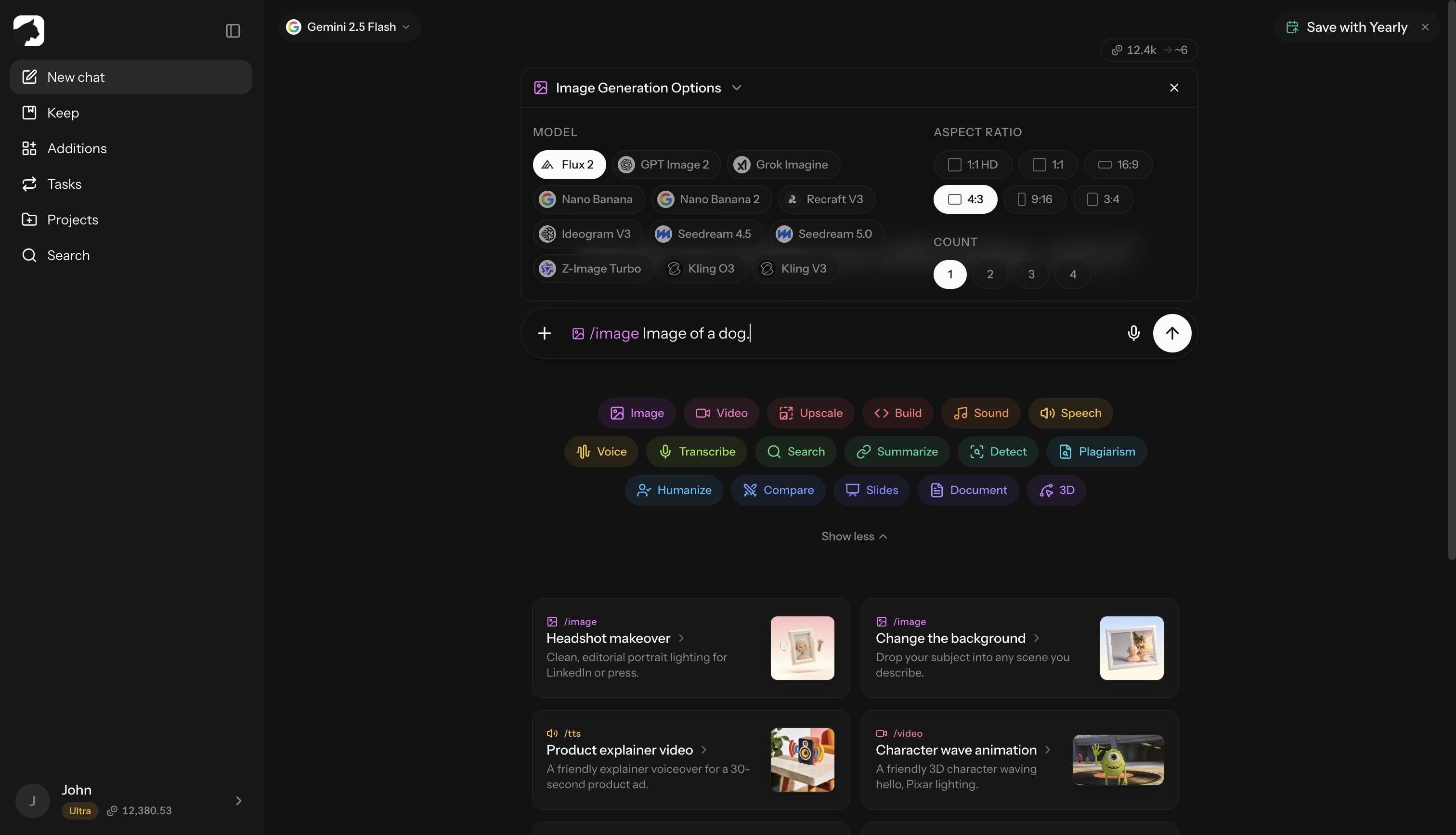
Edit an existing photo: click the + button next to the chat input, attach an image, then describe the change:
/image Make the sky a dramatic sunset and remove the cars
When one or more images are attached, /image switches to image-to-image mode automatically — no separate command needed. The picker then lists only models that support editing, and models that allow it accept multiple reference images for composite scenes, character consistency, or style transfer.
Available models
Krater always carries the latest image models. Open the options panel to switch model, aspect ratio, and count:
| Model | Credits | Best for |
|---|---|---|
| Flux 2 | 3 | Default pick — photorealistic workhorse; Pro, Max, Flex, Flash, Turbo and Klein rungs up to 18 |
| Nano Banana | 10 | Google’s all-rounder for generation and editing; Pro rung 38 |
| Nano Banana 2 / 2 Lite | 20 / 11 | Gemini 3.1 Flash generation with a 1K–4K resolution control |
| GPT Image 2 | from 14 | OpenAI’s latest — fine typography, strong instruction-following, exact sizes up to 4K, Low/Medium/High quality |
| Grok Imagine | 15 | xAI’s expressive model with the widest choice of aspect ratios |
| Recraft V4.1 | 9 | Text in images, logos, and vector styles (Pro 53) |
| Ideogram V4 | from 3 | Typography and text-heavy designs; Turbo, Balanced, and Quality speeds |
| Seedream 5.0 | 9 | ByteDance’s versatile model, up to 10 reference images (Pro 34) |
| Qwen Image 2 / 3 | 9–19 | Alibaba’s strong text rendering and editing family |
| MAI Image 2.5 Pro | 42 | Microsoft’s model, token-billed |
| Cosmos 3 Super | 10 | NVIDIA generation |
| Krea 2 | 8 | Aesthetic generation (Large 15) |
| Z-Image Turbo | 3 | Fastest path to a usable preview |
| Kling O3 | 7 | Up to 4K output (14) and 10 reference images via @Image1 syntax; Kling V3 handles edits |
Credits shown are per image at the default size. The live estimate in the options panel always reflects the exact model, size, quality, and count you picked before you send. Billing starts at 3 credits minimum.
Aspect ratios
Ratios depend on the model. Most offer:
- 1:1 — social posts, avatars, icons (with an HD variant for +1 credit)
- 16:9 — landscape (YouTube, presentations, banners)
- 9:16 — portrait (Stories, Reels, TikTok)
- 4:3 — standard photo
- 3:4 — portrait photo
Several models go further: Nano Banana adds 3:2, 2:3, and 21:9; Nano Banana 2 adds Auto, 5:4, and 4:5; Krea and Kling include 3:2, 2:3, and 21:9 (plus cinematic 2.35:1 on Krea); Grok Imagine covers phone-native ratios like 9:20 and 9:19.5. Resolution and quality controls appear where the model supports them — Nano Banana 2 and Kling O3 offer 1K–4K, GPT Image 2 offers exact pixel sizes up to 3840×2160 plus Low/Medium/High quality.
Count
Generate 1 to 4 variations per prompt. Each image is billed separately, and some models (Flux 2 Pro/Max/Flex, Recraft, Krea 2) render one image at a time.
Prompting tips
Be specific and descriptive:
- Weak: “A cat”
- Strong: “A fluffy orange tabby cat sleeping on a velvet couch, soft window light, photorealistic”
Include style keywords:
- Photorealistic, oil painting, watercolor, anime, 3D render, pencil sketch
Mention lighting and mood:
- Golden hour, dramatic shadows, neon glow, soft diffused light
For edits, be surgical:
- Weak: “Make it nicer”
- Strong: “Remove the trash can on the left and brighten the foreground”
- Strong: “Convert to a watercolor painting, keep the same composition”
Tips for great results
- Save reusable prompt templates under Additions → Prompts so you can re-run them across projects; finished images can be saved to Keep
- Combine multiple reference images on supported models — up to 10 on Seedream 5.0 and Kling O3 — to lock character identity, palette, or style
- Use higher-quality settings and 4K resolutions for hero shots; use Flux 2 or Z-Image Turbo (3 credits) for quick iterations
- Want more pixels on a finished image? Upscale it — or animate it
More in Slash Commands
- /video — Create Videos
- /upscale — Upscale Images & Video
- /build — Generate Apps, Sites & Code
- /sound — Music & Sound Effects
- /tts — Text to Speech
- /voice — AI Voice Transformation
- /transcribe — Transcribe Audio & Video
- /research — Research
- /summarize - Summarize URLs, Videos & Files
- /detect — AI Detection
- /plagiarism — Check Plagiarism
- /humanize - Make AI Text Natural
- /compare — Compare AI Models
- /slides — Generate Presentations
- /document — Create Documents
- /3d — Generate 3D Models