

/slides — Generate Presentations
Build full presentations from a single prompt The /slides command turns a single prompt into a complete, ready to present slide deck — outline, content, layouts, and styling, all generated in the c...
Build full presentations from a single prompt
The /slides command turns a single prompt into a complete, ready-to-present slide deck — outline, content, layouts, and styling, all generated in the chat. It runs on whichever chat model you have selected, so a stronger model writes a stronger deck.
How to use
/slides Make a slideshow about the rise of electric vehicles
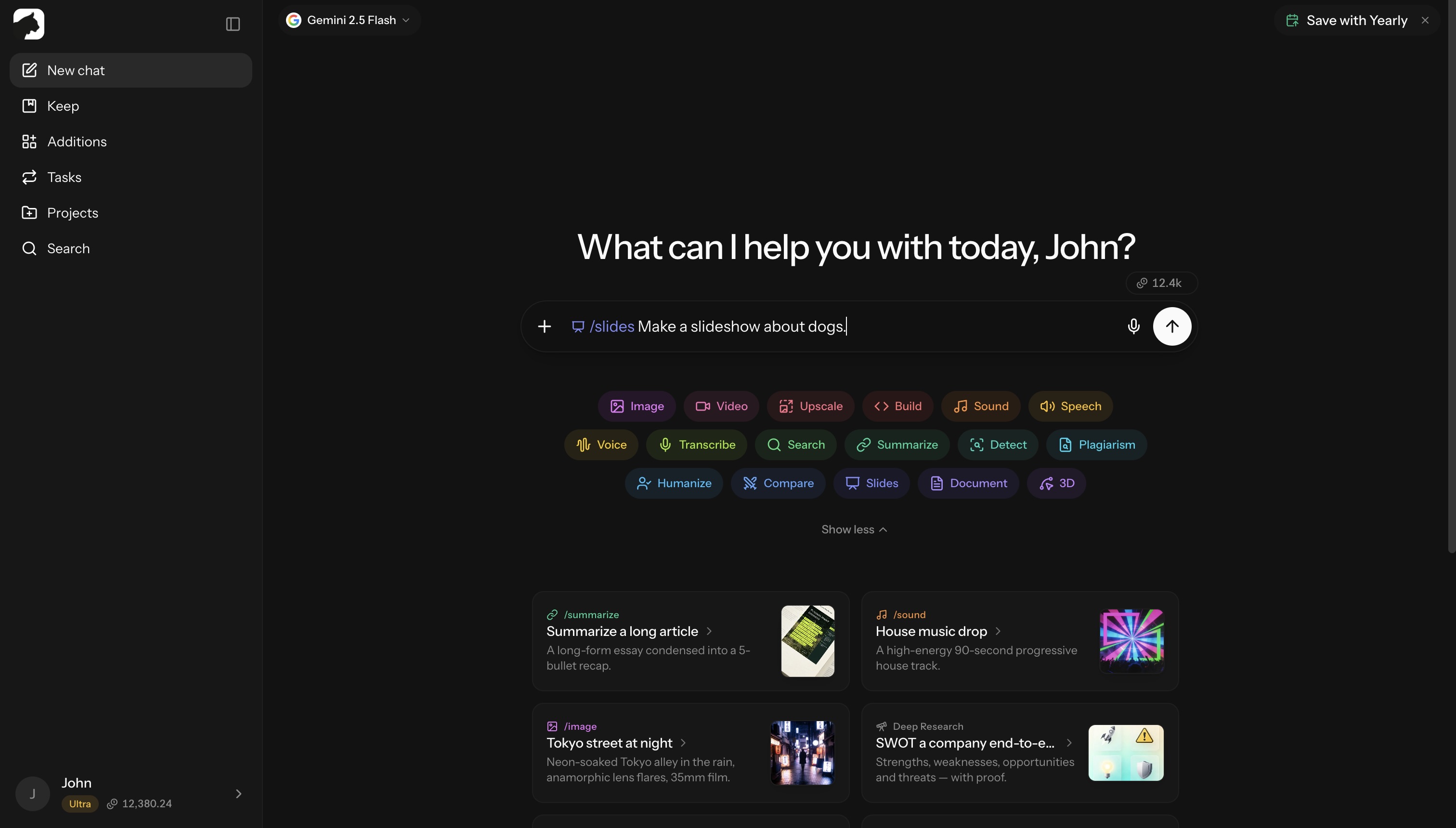
That’s the full command — describe the deck you want and Krater handles the rest. The finished deck lands in the chat as a card; click it to open the Slides Studio, a full-screen editor built just for decks.
What you get
- A complete deck — cover slide plus section slides with headings, bullet points, callouts, and stats
- Visual layouts — the model picks the right layout per slide (full-bleed image, two-column, chart, quote, comparison, etc.)
- Speaker notes — every slide ships with presenter notes you can edit
- 16:9 by default — ask for 4:3 in the prompt, or flip the ratio in Studio
- Up to 30 slides per deck
Slides Studio
- Edit text inline — click any text on a slide and type
- Swap images — click an image on the slide to upload a replacement
- Reorder, duplicate, delete, or add slides from the thumbnail strip (drag to reorder)
- Rename the deck and flip between 16:9 and 4:3 in the top bar
- Undo/redo structural changes with
⌘Z/⌘⇧Z(Ctrl+Z/Ctrl+Yon Windows)
Decks save automatically and show up in Keep.
Present, export, publish
- Present — full-screen present mode; arrow keys or a click advances,
Escexits - Export — download the deck as PPTX or PDF
- Publish — ship the deck to a live
your-slug.krater.sitelink, with copy-link and social share built in; republish any time to push updates (managed under Keep → Sites)
Prompting tips
Be specific about audience and goal:
- Weak: “Make a deck about AI”
- Strong: “10-slide investor pitch for an AI fitness coaching app, audience is seed-stage VCs, focus on traction and unit economics”
Specify length when it matters:
- “Make a 5-slide TL;DR of …”
- “Create a 20-slide deep-dive on …”
Reference real content:
- Paste an article, brief, or notes above the
/slidesline — Krater uses that as source material instead of writing from scratch
Name a style if you want one:
- The model designs each deck to fit your topic, so steer it: “minimal and dark, lots of whitespace”, “bold keynote style”, “corporate blue and gray”
Great use cases
- Investor and pitch decks
- All-hands and team updates
- Product launches and feature explainers
- Workshop and training material
- Conference talks and keynotes
- Quick recap decks from a long doc or article
Credits
/slides is billed like a normal chat message: your selected model’s rate on the output tokens it writes. A typical slide works out to ~12 credits — the picker shows a 60-credit estimate up front, and the final charge depends on your model and deck length.
Related: /document — Create Documents · /build — Generate Apps, Sites & Code
More in Slash Commands
- /image — Generate & Edit Images
- /video — Create Videos
- /upscale — Upscale Images & Video
- /build — Generate Apps, Sites & Code
- /sound — Music & Sound Effects
- /tts — Text to Speech
- /voice — AI Voice Transformation
- /transcribe — Transcribe Audio & Video
- /research — Research
- /summarize - Summarize URLs, Videos & Files
- /detect — AI Detection
- /plagiarism — Check Plagiarism
- /humanize - Make AI Text Natural
- /compare — Compare AI Models
- /document — Create Documents
- /3d — Generate 3D Models