

/video — Create Videos
Generate videos from text, images or clips The /video command creates AI generated video from a prompt. Type a scene description, animate an uploaded image, or hand a model an existing clip to edit...
Generate videos from text, images or clips
The /video command creates AI-generated video from a prompt. Type a scene description, animate an uploaded image, or hand a model an existing clip to edit or extend. The picker groups 16 model families — budget drafts to cinematic flagships — with Fast, Standard and Pro quality rungs where a family offers them.
How to use
/video Ocean waves crashing on a rocky shore at golden hour
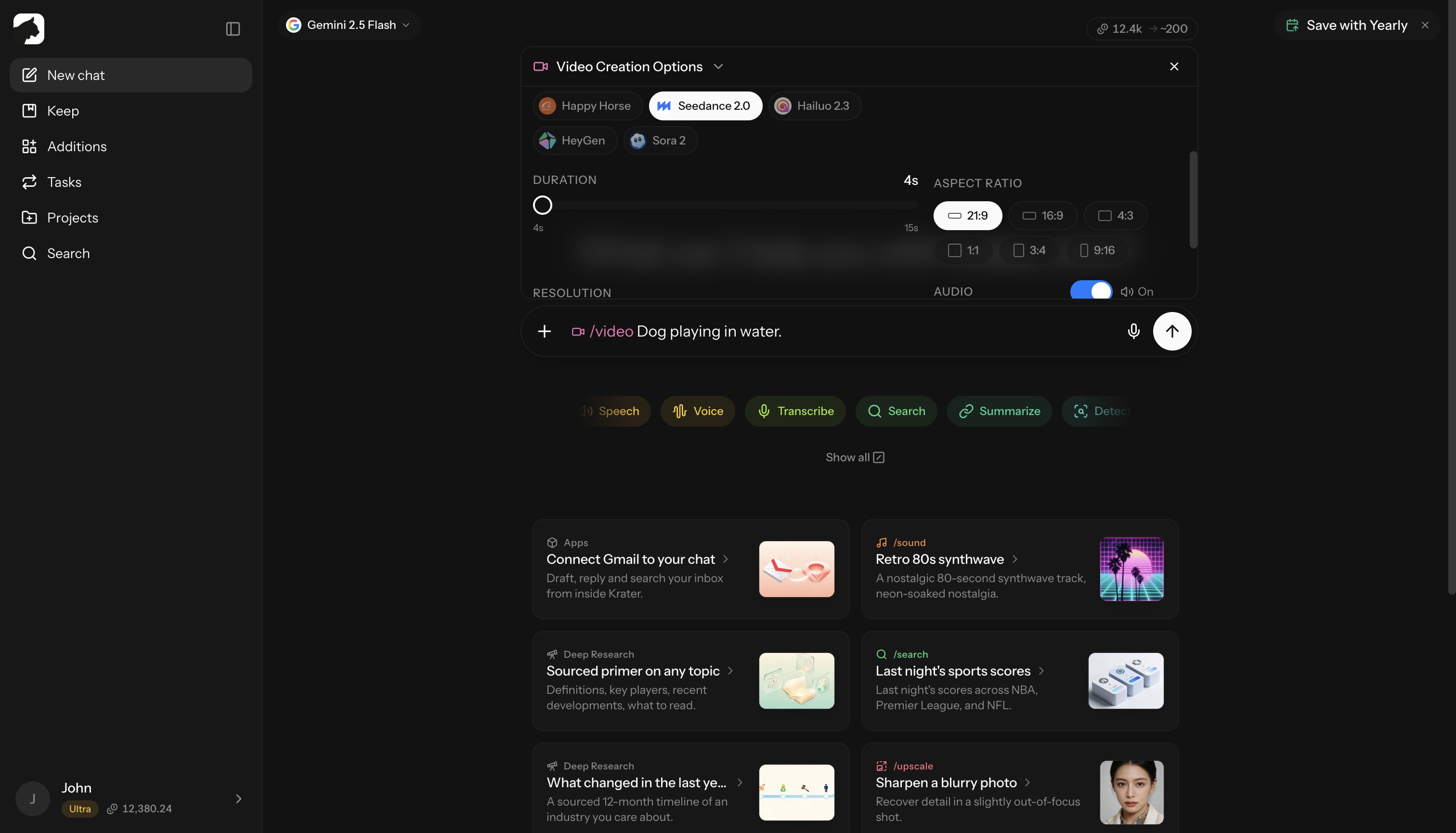
Or attach an image and use /video to animate it. Attach a video instead for modes that transform or continue existing footage.
The options panel sets the model family, version, mode, duration, aspect ratio, resolution and audio (where the model offers a toggle) and shows the exact credit estimate before you run.
/video requires a Pro, Ultra or Max plan, or a team seat. See plans.
Models
Rates are credits per second of output at the family’s base resolution, before resolution, audio or Pro multipliers.
| Family | From | Duration | Notes |
|---|---|---|---|
| Kandinsky 5 | 4 cr/s | 5 s | Cheapest drafts; silent |
| PixVerse (C1, V6) | 6.25 cr/s | 1–15 s | Optional audio; V6 adds Transition and Extend modes |
| Veo 3.1 (Lite / Standard / Pro) | 7.5 cr/s | 4–8 s | Google flagship; native audio; Pro rung 50 cr/s |
| HeyGen (and v5 Digital Twin) | 8.5 cr/s | up to 60 s | AI presenter — avatar, voice and scene; billed on delivered seconds |
| Vidu Q3 (and Turbo) | 8.75 cr/s | 1–16 s | Native audio; subject-consistency Reference mode; Turbo animates images fast |
| Grok Imagine (and Video 1.5) | 12.5 cr/s | 2–15 s | Audio included; Transform mode edits clips |
| LTX (2.5 and 2.3) | 15 cr/s | 6–20 s | Up to 4K; Fast and Pro rungs; auto-duration option |
| Flux 3 (and Draft) | 15 cr/s | 5–20 s | Black Forest Labs; native audio; widest ratio support |
| Kling (O3, 3.0, 2.6, O1) | 17.5 cr/s | 3–15 s | @Element and @Image references; Transform, Continue and Animate Frames modes; Motion Control up to 30 s |
| MiniMax (H3 and Hailuo 2.3) | 20 cr/s | 5–15 s | Up to 4K; first five reference images free |
| Luma Ray 3.2 | 25 cr/s | 5 or 10 s | Cinematic look; silent |
| Sora 2 | 25 cr/s | 4–12 s | OpenAI’s flagship; silent |
| Wan (2.7 and 2.6) | 25 cr/s | 2–15 s | Multi-shot clips with background music |
| Gemini Omni Flash | 32 cr/s | 3–10 s | Synchronized audio |
| Happy Horse (1.0 and 1.1) | 35 cr/s | 3–15 s | Up to nine character references; video Edit mode |
| Seedance (2.0 and 1.5) | 60.5 cr/s | 4–15 s | ByteDance flagship; references can mix image, video and audio mentions; Pro rung 75.9 cr/s |
Aspect ratios and resolution
- 16:9 — widescreen
- 9:16 — vertical (TikTok, Reels, Shorts)
- 1:1 — square
- 4:3 / 3:4 — classic and portrait
- 21:9 — ultrawide cinematic (Flux 3, PixVerse, Luma, MiniMax, Happy Horse, Seedance)
- Model-specific extras include 2:1, 3:2, 2:3, 5:4, 4:5 and 9:21; Flux 3 also offers
auto.
Resolutions run from 360p drafts to 4K (LTX, MiniMax H3, Kling 3.0). Higher resolutions multiply the per-second rate — LTX 2.5 at 4K costs about 3.3x its 720p rate.
Audio
Many models generate native audio (Veo 3.1, Flux 3, Vidu Q3, Kling, Seedance, Happy Horse, PixVerse, Gemini Omni, LTX). On some it is included in the rate; on others an audio toggle changes the per-second price — Kling 2.6 and Veo 3.1 Pro roughly double with audio on. Sora 2 and Luma Ray 3.2 generate silent video.
Beyond text-to-video
- Image-to-video — attach an image to animate it; supported by most models.
- Reference images — keep characters and objects consistent: MiniMax H3 (first five free), Happy Horse (up to 9), Grok Video 1.5 (up to 7), Kling O3 (
@Element/@Imagementions), Vidu Q3 and Seedance 2.0 (image, video and audio mentions). - Edit or transform — natural-language edits on an uploaded clip: Grok Imagine Transform, Kling O3 Transform, Happy Horse Edit.
- Extend / continue — generate the next shot from a clip: PixVerse V6 Extend, Kling O3 Continue.
- Start/end frames — Kling O3 Animate Frames interpolates between two images.
- Motion control — Kling 2.6 applies the motion of a reference video to a character image (up to 30 s of character motion).
- AI presenter — HeyGen builds avatar, voice and scene from the prompt alone, billed by delivered seconds up to 60 s.
Modes billed on the uploaded clip’s length accept inputs up to 60 seconds.
How billing works
- You pay per generated second: model rate × duration, multiplied by resolution, audio and Pro-tier factors, plus small surcharges for extra reference images on some models.
- Base rates span 4–76 credits per second across the catalog.
- The estimate is shown before you run. Credits are reserved up front, the final cost is settled to the actual charge when the video completes, and failed generations are refunded automatically.
- Videos land in the chat. Save them to Keep for 1 credit or download the MP4.
- Upscale a finished clip with
/upscale, billed per output megapixel.
Tips for great videos
- Describe motion explicitly — “a hummingbird hovering near a red flower, wings blurred” beats “a bird”.
- Keep prompts focused — one subject, one action, one camera move.
- Anchor with a reference — an uploaded start image or character references give far more predictable results than text alone.
- Draft cheap, finish strong — iterate at low resolution on a fast model, then re-run the winning prompt on a Pro rung.
Related: /image, /upscale, /sound
More in Slash Commands
- /image — Generate & Edit Images
- /upscale — Upscale Images & Video
- /build — Generate Apps, Sites & Code
- /sound — Music & Sound Effects
- /tts — Text to Speech
- /voice — AI Voice Transformation
- /transcribe — Transcribe Audio & Video
- /research — Research
- /summarize - Summarize URLs, Videos & Files
- /detect — AI Detection
- /plagiarism — Check Plagiarism
- /humanize - Make AI Text Natural
- /compare — Compare AI Models
- /slides — Generate Presentations
- /document — Create Documents
- /3d — Generate 3D Models