

/summarize - Summarize URLs, Videos & Files
Summarize links, YouTube videos and files The /summarize command turns long content into the key points. Paste a link to an article, a YouTube video or a document, and Krater reads it and replies w...
Summarize links, YouTube videos and files
The /summarize command turns long content into the key points. Paste a link to an article, a YouTube video or a document, and Krater reads it and replies with a digest in the same chat.
Cost: from about 3 credits per run, billed at your selected model’s rate. The estimate shows before it runs.
How to use it
Type /summarize followed by what you want condensed:
/summarize https://example.com/long-article
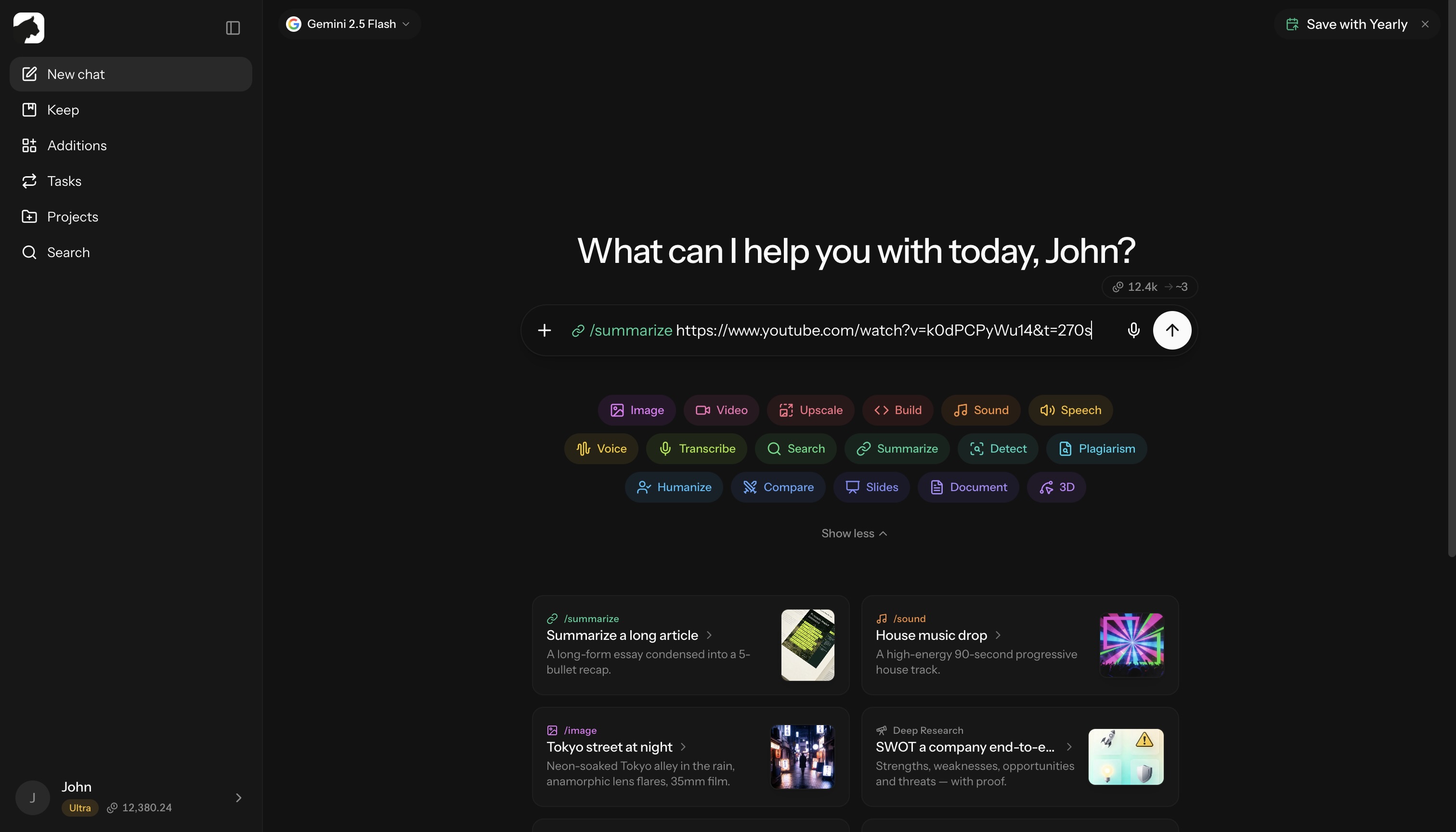
The command auto-detects what you gave it:
| Input | What happens |
|---|---|
| Web page URL | The page is scraped and the main content extracted, then your selected chat model summarizes it |
| YouTube URL | Gemini watches the video natively and summarizes what was actually said |
| Document URL (PDF, DOCX, XLSX) | The file is parsed directly and summarized |
| Attached video file | A vision-capable model analyzes the upload and summarizes it |
Works with articles, blog posts, news stories, documentation pages, online papers, reports and forum threads.
Summarize a YouTube video
Paste any YouTube link:
/summarize https://youtube.com/watch?v=dQw4w9WgXcQ
/summarize https://youtu.be/dQw4w9WgXcQ
YouTube links go through Gemini’s native video understanding, so the summary reflects the actual video, not just the title and description. No captions or transcript required.
You get the main topics, key points, notable moments and conclusions. For that one request Krater temporarily uses a Gemini model; your selected model stays unchanged for everything else.
Summarize a document
Paste the document’s URL. Links that point at a file (PDF, DOCX, XLSX and similar) are detected and parsed directly:
/summarize https://example.com/annual-report.pdf
For a local file, attach it to a normal chat message and ask for a summary. Uploads accept any file type up to 500 MB.
Summarize a video file
Attach the video to your message and send /summarize. If your selected model cannot see video, the request is routed to a vision-capable model for that message only.
Customizing the summary
Tell Krater what you need in the same message or as a follow-up:
Length
- “Give me a 3-sentence summary”
- “Summarize in 5 bullet points”
- “Provide a detailed breakdown”
Focus
- “Focus on the methodology and key findings”
- “Extract the pricing details”
- “List the actionable steps”
Format
- “Create an executive summary”
- “Summarize as a table of pros and cons”
- “Give me the TL;DR”
- “Translate the summary to German”
Example prompts
For research:
/summarize https://arxiv.org/abs/paper-id
Extract the methodology and key findings
For news:
/summarize https://news-site.com/story
What are the main facts and who is involved?
For tutorials:
/summarize https://youtube.com/watch?v=tutorial
List the steps in order
For documentation:
/summarize https://docs.example.com/api
What are the main endpoints and how do I authenticate?
What you get
A typical summary includes:
- Overview: a short paragraph explaining what the content is about
- Key points: the most important takeaways as bullets
- Notable details: specific data, quotes or insights
- Source info: title and link back to the original
The reply arrives as a normal chat message, so you can keep asking follow-up questions:
- “What did they say about pricing?”
- “Explain that technical term”
- “What is the main counterargument?”
- “Give me more detail on point 3”
The content stays in the conversation, so follow-ups do not re-fetch or re-bill the page.
Tips for better summaries
| Tip | Example |
|---|---|
| Say what you need it for | “Summarize for a slide deck” |
| Name the sections you care about | “Focus on results, skip the intro” |
| Ask for a format | “5 bullets, then a one-line verdict” |
| Compare across sources | Run it on two links, then ask “how do these differ?” |
Limits
- Paywalled and login-gated pages cannot be scraped. Download the file and attach it in a normal message instead.
- Private or removed YouTube videos cannot be watched.
- Very long pages are condensed to the most relevant sections before summarizing; extremely long documents may cover the first portion only.
- A summary compresses by definition. For legal, medical or financial documents, treat it as a map to the original, not a replacement.
- The command itself expects a URL or an attached video. For pasted text, send the text with your request, no command needed.
- Requires a signed-in account.
Why /summarize?
| Instead of | Use /summarize |
|---|---|
| Reading a 20-minute article | Get the key points in seconds |
| Watching a 1-hour video | Extract what was said in moments |
| Skimming a 50-page PDF | Get a structured overview |
| Ten open tabs | One command, one digest |
From about 3 credits a run, billed at your selected model’s rate.
Related
- /transcribe: turn audio and video into text
- /research: cited multi-source answers
- Uploading files to chat
- Understanding credits
More in Slash Commands
- /image — Generate & Edit Images
- /video — Create Videos
- /upscale — Upscale Images & Video
- /build — Generate Apps, Sites & Code
- /sound — Music & Sound Effects
- /tts — Text to Speech
- /voice — AI Voice Transformation
- /transcribe — Transcribe Audio & Video
- /research — Research
- /detect — AI Detection
- /plagiarism — Check Plagiarism
- /humanize - Make AI Text Natural
- /compare — Compare AI Models
- /slides — Generate Presentations
- /document — Create Documents
- /3d — Generate 3D Models